
Practical guide
Online scams in Bahrain: how to spot, stop and report them
By Gaurav Agarwal · Updated 21 October 2026
Report suspected cybercrime in Bahrain through the official ACEES form, hotline 992 or WhatsApp 00973 1710 8108. Stop contact, protect the affected account and preserve the records you will need for the report.
Official routes checked 21 October 2026.
Independent guide, not legal advice. Use the linked official portals for reporting and do not enter personal details anywhere else.
Open the official cybercrime report form01What to do in the first 10 minutes
Imapro practical advice: stop replying, do not send another payment and do not share another one-time code. Use a different trusted device if you think the phone or computer itself may be compromised.
Imapro practical advice: contact the bank or payment provider through the number in its official app, website or on the back of the card. Ask it to secure the account, review the transfer and explain its dispute process. Record the time, agent name and case reference.
Imapro practical advice: preserve the conversation before blocking the sender. Save the profile name, phone number, email address, message thread, payment receipt, account or wallet details, website address, advertisement and any delivery promise. Keep the original files as well as screenshots.
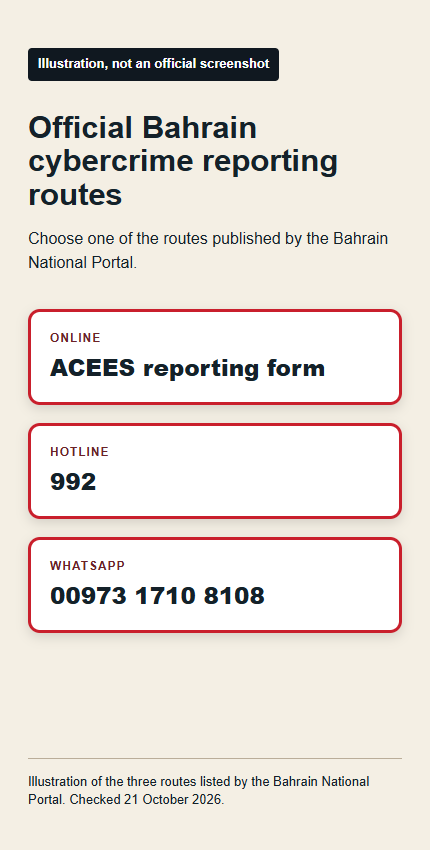
Then choose the report route. Suspected cybercrime can go to the police direct form, hotline 992 or WhatsApp 00973 1710 8108.
02Report suspected cybercrime to Bahrain Police
The Bahrain National Portal lists three official cybercrime routes: the direct reporting form, hotline 992 and WhatsApp 00973 1710 8108. The emergency contacts directory separately lists the Anti-Corruption and Economic and Electronic Security number as 992.
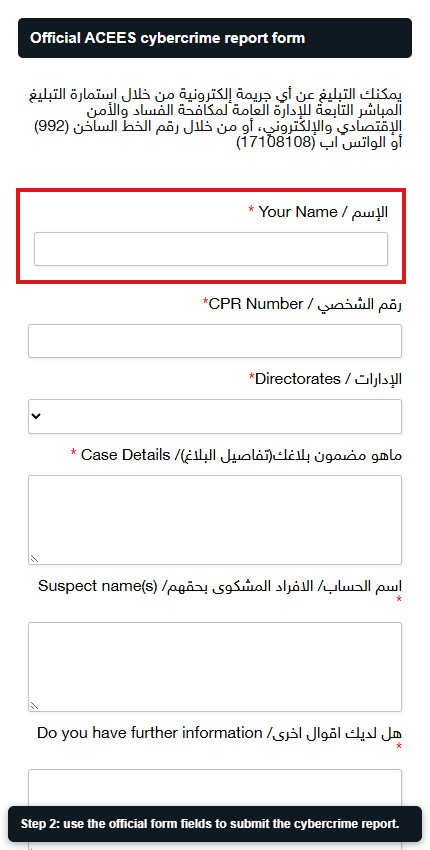
Use the online form when you can describe the incident and attach a clear record. The public form asks for your name, CPR number, directorate, case details, suspect name, further information and contact number. Prepare those details before you start, but submit personal information only on the official acees.gov.bh page.
Imapro practical advice for structuring the report: state what happened, when it began, how the person contacted you, what they asked for, what you sent or paid, and what happened next. List every amount and time exactly as shown in your records. Do not edit screenshots in a way that removes the sender, date or transaction reference.
Bahrain’s emergency directory lists Police Rescue, Ambulance and Civil Defence on 999. For the cybercrime report itself, use the listed 992 or online channels.
03Use the NCSC route for a cyber incident
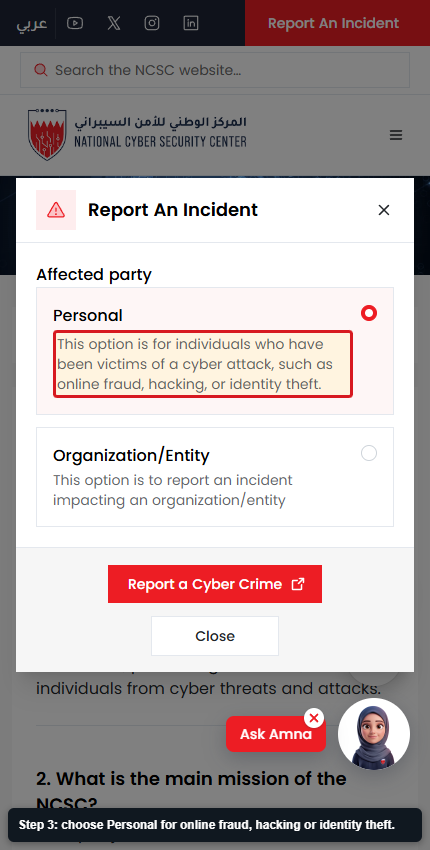
The National Cyber Security Center says a suspected cyber threat or security breach can be reported through its official online incident form. In the public incident panel, choose Personal for online fraud, hacking or identity theft.
This route fits account compromise, malware, hacking or another security incident where technical response may be needed. A suspected crime can still be reported to police. Using one route does not require you to delay the other when both clearly apply.
NCSC says personal data collected through incident reporting forms is used for official purposes such as analysing threats or facilitating incident response. Include enough technical detail to identify the incident, but never place a current password, one-time code or full payment-card number in the narrative.
Imapro practical advice for technical notes: device type, affected account, date and time, suspicious URL, sender address, file name, security alert and the action you already took. Preserve suspicious files without reopening them.
04Choose the official route that matches the problem
A scam can create more than one problem at once. Report the suspected crime, secure the payment route and use the consumer channel where the dispute concerns a merchant. The table helps you separate those tasks.
Bahrain’s emergency directory lists Consumer Protection on 17007003. MOIC gives its centre hours as Sunday through Thursday from 7:30 to 2:00. The police cybercrime hotline is 992. The NCSC publishes a separate incident-report route.
For unauthorised bank, card, wallet or payment activity, contact the financial institution first and send its complaints team a written complaint. If its written response is unsatisfactory, the CBB procedure says to submit the complaint with that response through the CBB consumer-protection website, Tawasul or by hand at the CBB building.
| Situation | First official route | What to prepare |
|---|---|---|
| Suspected cybercrime or online fraud | Police report form, 992 or WhatsApp 00973 1710 8108. | Timeline, sender details, messages and payment references |
| Immediate danger or urgent rescue need | 999 for Police Rescue, Ambulance or Civil Defence. | Your location, immediate risk and callback number |
| Account compromise, malware or security breach | NCSC Report An Incident. | Affected account or device, timestamps, URLs and alerts |
| Problem with a commercial seller | MOIC Consumer Protection Center | Receipt, order, seller details and written promise |
| Unauthorised bank or wallet activity | Contact the bank or payment provider first; escalate an unsatisfactory written response through the CBB complaint routes. | Transaction reference, alert time, your written complaint and the institution’s written response |
05How common online scam messages reveal themselves
NCSC describes phishing as an email, text message or phone call that pretends to come from a legitimate organisation. The goal can be to obtain passwords, banking information or credit card information.
Treat an unexpected request for a password, one-time code, card detail, remote-control app or urgent payment as a stop signal. Verify the organisation through an official app, statement or website you opened yourself. Do not use the phone number or link inside the suspicious message to perform that check.
A familiar account is not proof that the message is safe. NCSC warns that hacked social accounts can be used for impersonation and scams, and advises caution when a message from a friend looks suspicious. Confirm unusual requests through a separate contact route.
Look at the whole pattern: unexpected contact, pressure to act quickly, a request to move to another chat, a payment to a personal account, a promise that depends on secrecy, or a link whose domain does not match the organisation. Any one clue deserves a pause. Several together justify verification before any action.
06Evidence to save before you block the sender
Save the evidence in a folder with the date in its name. Keep the original message export when the app provides one, plus readable screenshots. Photograph a second device screen only when the app prevents capture and make sure the sender, time and content remain visible.
For payments, save the receipt, bank alert, beneficiary name, account or wallet identifier, transaction reference, amount and time. Do not publish these records. Share them only through the official reporting or dispute route that needs them.
For a website or advertisement, save the full URL, page title, seller name, product or service, promised delivery, stated price and the page where payment was requested. A cropped image of only the logo may not show which account or domain was used.
For calls, write down the caller number, claimed organisation, exact request and time. If the caller asked you to install software or share the screen, record the app name and permissions you granted. Do not reopen a suspicious attachment merely to improve the report.
| Evidence | Why it helps |
|---|---|
| Full conversation | Shows the sequence, sender identity and pressure tactics |
| Profile and contact details | Connects the message to a number, address or account |
| Payment record | Shows the beneficiary, amount, time and transaction reference |
| Website and advertisement | Preserves the domain, offer and claimed seller |
| Device or account alerts | Shows when access, login or security changes occurred |
| Your action log | Records calls, report references and security steps |
07Secure the affected accounts after reporting
NCSC recommends two-factor authentication and strong passwords that are not reused across accounts. Change the affected password from a trusted device, then change any other account that used the same password. Sign out other sessions when the service provides that option.
Check recovery email addresses, phone numbers, forwarding rules, linked devices and recent logins. Remove anything you do not recognise. If the email account was compromised, secure it before relying on password-reset messages for other services.
NCSC advises keeping personal information to a minimum and disabling geolocation access for social media apps. It also advises caution with suspicious links and keeping app versions and privacy settings current.
Monitor the account and payment history after the first response. Keep every new alert with the original evidence. If the attacker contacts you again, add it to the same case timeline instead of starting an unrelated record.
08When the problem is a seller or online shop
A late order, refund dispute or misleading commercial offer may need the consumer route as well as a police report when fraud is suspected. Bahrain’s emergency directory lists Consumer Protection on 17007003. MOIC gives its centre hours as Sunday through Thursday from 7:30 to 2:00.
Keep the invoice, order confirmation, warranty, product page, delivery promise and your written attempt to resolve the problem with the seller. Separate what was promised from what occurred. A short timeline makes the complaint easier to review.
Do not label every unresolved purchase as cybercrime. Use the police route for suspected crime, the NCSC route for the security incident and MOIC for the merchant issue. If money moved through a bank, card or wallet, notify that provider through its official contact route too.
09What the official pages do not decide for you
The checked public pages list reporting channels and security advice, but they do not promise recovery of money or give one response time for every report. Do not delay the bank or payment-provider contact while waiting for another channel to respond.
The public pages do not decide whether your facts amount to a criminal offence, a consumer dispute or both. Describe what happened and preserve the evidence. Let the receiving authority classify the case.
The NCSC FAQ says its incident form handles suspected cyber threats or security breaches. The Bahrain National Portal lists the police cybercrime form. It also lists 992 and WhatsApp 00973 1710 8108. Choose the route from the facts of the incident, and use more than one when separate problems clearly exist.
10FAQs
What number do I call to report cybercrime in Bahrain?
Bahrain’s official cybercrime hotline is 992. The National Portal also lists the direct police report form and WhatsApp 00973 1710 8108.
Should I call 999 for an online scam?
Bahrain’s emergency directory lists Police Rescue, Ambulance and Civil Defence on 999. For a cybercrime report, the official listed hotline is 992.
Can I report a Bahrain online scam through WhatsApp?
Yes. The Bahrain National Portal lists WhatsApp 00973 1710 8108.
What does the online police form ask for?
The public form asks for name, CPR number, directorate, case details, suspect name, further information and contact number.
Where do I report a hacked account or malware incident?
The NCSC says a suspected cyber threat or security breach can be reported through its official online incident form.
How do I recognise a phishing message?
NCSC says phishing can arrive by email, text or phone while pretending to be a legitimate organisation and seeking passwords, banking or card information.
Where do I complain about an online seller in Bahrain?
Bahrain’s emergency directory lists Consumer Protection on 17007003. Preserve the receipt, order record and seller communication before calling.
What should I save as evidence?
Save the complete conversation, sender details, website address, advertisement, payment record, account alerts and a dated log of the actions you took.
11Official sources
- Bahrain National Portal: Reporting Cybercrimes
- ACEES: Report a Criminal Case
- NCSC: Privacy concerns and threats
- NCSC frequently asked questions
- MOIC Consumer Protection Center
- Bahrain National Portal: Emergency Contacts
- CBB official complaints procedure for banks and financial institutions
Sources checked 21 October 2026.
Related guides: Bahrain e-commerce cybersecurity for businesses