Batelco Bill Payment: How to Check and Pay Your Bill
To pay without signing in, open Quick Pay on Batelco’s site and choose Quick Bill Payment.
To see what you owe first, sign in to the Batelco app or open Pay My Bills in eServices.
How do you want to pay?
Pay once
- Open Quick Pay
Pay several lines
- Use Pay My Bills
Pay on your phone
- Sign in to the Batelco app
Use BenefitPay
- Open Fawateer
Pay each month
- Set up AutoPay
How do you pay without signing in?
Before you start, have your postpaid number (the number of the line Batelco bills each month) and the amount on your bill ready.
- Open Quick Pay in the black bar on Batelco’s website. Choose Quick Bill Payment.
- In the Service ID box, type your postpaid number. In the Amount box, type the amount you want to pay.
- Under Select your payment method, choose BEYON Money, Credit Card or Debit Card. Then click Pay.
How do you check the bill and pay several lines?
Use Pay My Bills in eServices (Batelco’s online account) to see what you owe and choose which lines to pay.
- Sign in to eServices and enter the one-time code sent to your registered phone and email.
- Open Payment & Billing at the top and select Pay My Bills.
- Tick the lines you want to pay to add them to your cart.
- In the cart, change an amount or remove a line if needed. The total updates as you go.
- Choose a payment method and click Pay.
Where can you pay in the Batelco app?
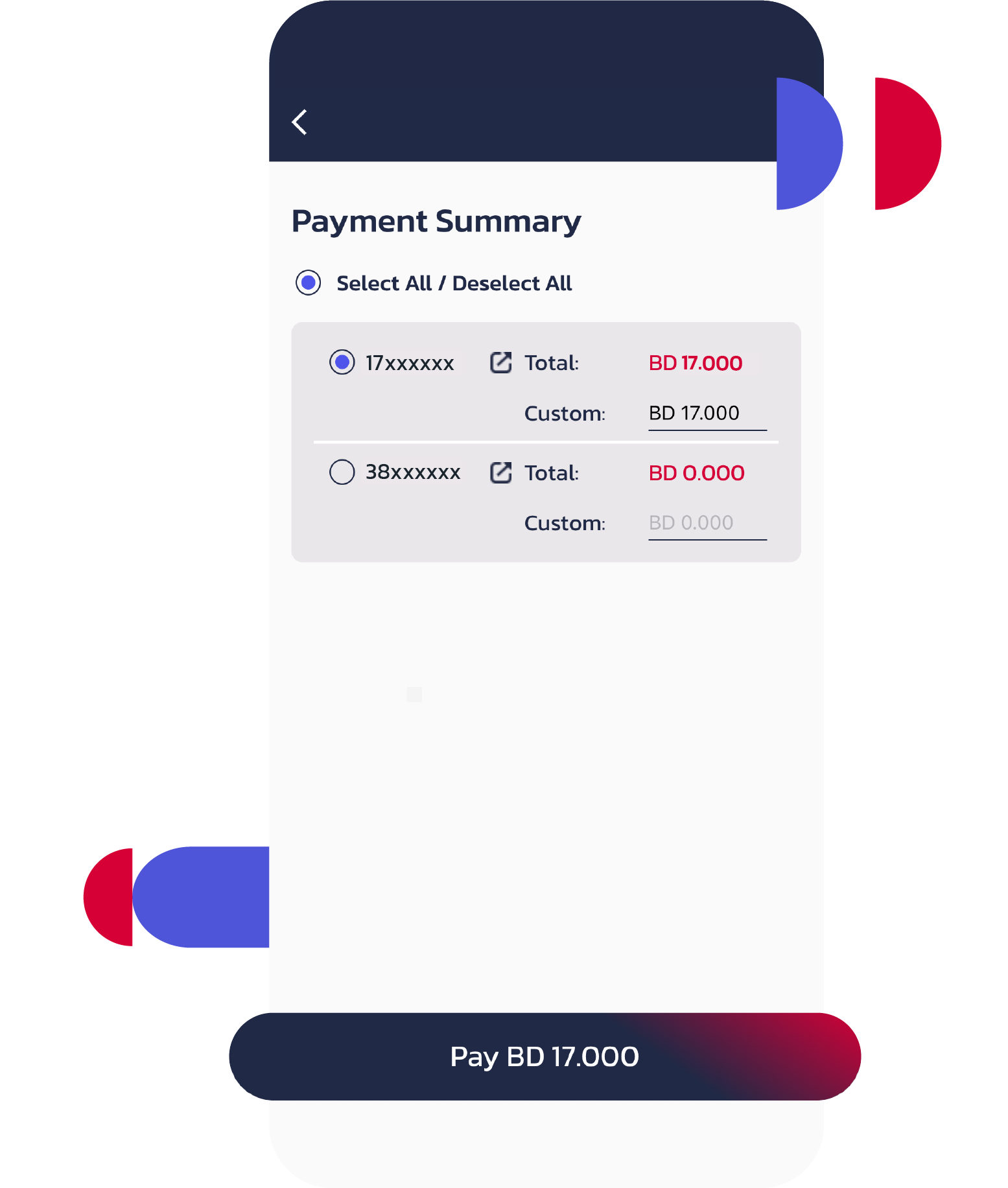
Sign in to the Batelco app and go to Payment Summary.
On Payment Summary, select the lines you want to pay. Check the total and tap Pay.
After you pay, you can find the payment in your eServices payment history.
Can you pay with BenefitPay?
Yes. In the BenefitPay app, open Fawateer (the bill payment service).
Open Direct Bill Payment and choose Batelco. Enter the amount and press Pay.
After paying, open Transaction History to see the payment status.
For a business bill, choose Fawateer in the Batelco Business Portal to get a payment reference number. You can use that number in BenefitPay, Sadad or a bank that supports Fawateer. The portal can group several bills under one number.
How do you set up AutoPay?
Set up AutoPay in eServices to charge your saved credit card each month.
- If you have no saved card, pay a bill of at least BD 3 and save the card as you pay.
- Go to Payment & Billing and select AutoPay.
- Choose Billed Amount to pay the amount on each bill, up to a limit you set. Or choose Specific Amount and type the amount to pay each month.
- Pick the day of the month for the payment, then click Next.
Which payment option should you use?
Batelco takes cash, debit cards and credit cards. To pay in cash or get help in person, visit a Batelco shop or call 196.
| Route and sign-in | What you enter | Where your proof of payment is |
|---|---|---|
| Quick Pay on Batelco’s website, with no sign-in | Your postpaid number and the amount | Batelco’s page does not say |
| Pay My Bills in eServices, after you sign in | A one-time code, then the lines to pay | Financial Summary in eServices |
| Payment Summary in the Batelco app, after you sign in | The lines to pay | Financial Summary in eServices |
| Fawateer in the BenefitPay app | The amount | Transaction History in the BenefitPay app |
| AutoPay in eServices, after you sign in | A limit or an amount, and the day of the month | Batelco’s page does not say |
Where do you get a copy of your bill or receipt?
You can download a receipt from Financial Summary in eServices.
- Open My Services and select the line you paid.
- Open Financial Summary and find the payment.
- Click Download to save the receipt.
To get future bills by email, go to Overview under My Services. Open Bill Preferences and click the pen to add your email address.
What if your bill is overdue or looks wrong?
What is wrong with the bill or line?
The line is suspended
- Open Line Reconnection
The amount looks wrong
- Call Batelco
Your bill comes once a month, and you have 21 days after the billing day to pay it. If you miss that, Batelco can suspend or cut off the line, so pay now with Quick Pay, the app or eServices. If the amount looks wrong, call Batelco before the 21 days run out.
How do you get a line working again?
If Batelco has suspended your line, open Line Reconnection in eServices. Click Reconnect and then Confirm.
This is a short reconnection. The line works again for a couple of days, and you can do it only once. Pay the bill before it ends.
If Batelco has cut off your line for a missed bill, pay what you owe or arrange a payment plan. Batelco reconnects it within one working day of full payment or plan approval.
Batelco’s support page lists a fee of BD 3 to reconnect a mobile line after a missed bill, and its online terms list BD 3.30. Plan to pay BD 3.30, the higher fee, and call 196 to confirm what Batelco will charge you. Reconnecting a fixed line costs BD 5.
Who do you call if the charge looks wrong?
Call 196 for a home line or 17881144 for a business line. Ask for a case number so you can follow up.
If Batelco still has not resolved the complaint after 60 days, call the TRA (Bahrain’s telecom regulator) on 81188. You can call the TRA sooner if you disagree with Batelco’s answer.
Frequently asked questions
Can you pay for a line that has been closed?
Yes. Open Quick Pay and choose Quick Payment (Ceased Line). In the CPR/CR box, type your CPR number (your national ID number). For a business line, type the CR number (the commercial registration number). Then enter the service ID of the closed line and the amount.
Sources
How to pay with Fawateer · BenefitPay · Business Portal · Fawateer guide
Batelco payments · How to pay a bill · Postpaid bills in the app · Batelco app Payment Summary · AutoPay · Pay for a closed line
Batelco accounts · Payment history · Download a receipt · Get bills by email · Temporary line reconnection
Batelco reconnection fees · Support page, read 7 November 2026 · Mobile Postpaid Terms PDF, read 6 November 2026 · Online Mobile Postpaid Terms, read 7 November 2026
Billing complaints · TRA complaint steps
Published