How to Add Music to a Video on iPhone, Android and PC

Short answer
On iPhone, open your movie project in iMovie, tap Add Media, then Audio and Soundtracks. Choose a track and tap Add Audio. iMovie places it at the start and fits it to the project’s length.
Open your movie project in iMovie, tap Add Media and then Audio, pick a soundtrack and tap Add Audio, fit the music to your video, then set the volume.
On Windows, Clipchamp lets you add an audio file or stock music to the timeline. On Android, Google Photos has Add Music for highlight videos. The full walkthrough here follows iMovie on iPhone.
Before you start
Have your video ready in a movie project before choosing the music. Some iMovie soundtracks need downloading, so keep an internet connection available.
- Use iMovie on your iPhone.
- Open the movie project you want to work on.
- Choose between a built-in soundtrack and music you have permission to use.
By the end, you will have music in your movie project, fitted to the video and adjusted to a volume you choose. If you still need to prepare the footage, see editing a video on iPhone.
Step 1: open your movie project
Open iMovie on your iPhone and open a movie project. This guide starts with that project, rather than a song in your music library.
Our suggestion: listen to the original video before adding anything. Decide whether the soundtrack should sit under speech or carry a clip with no talking.
Step 2: tap Add Media, then Audio
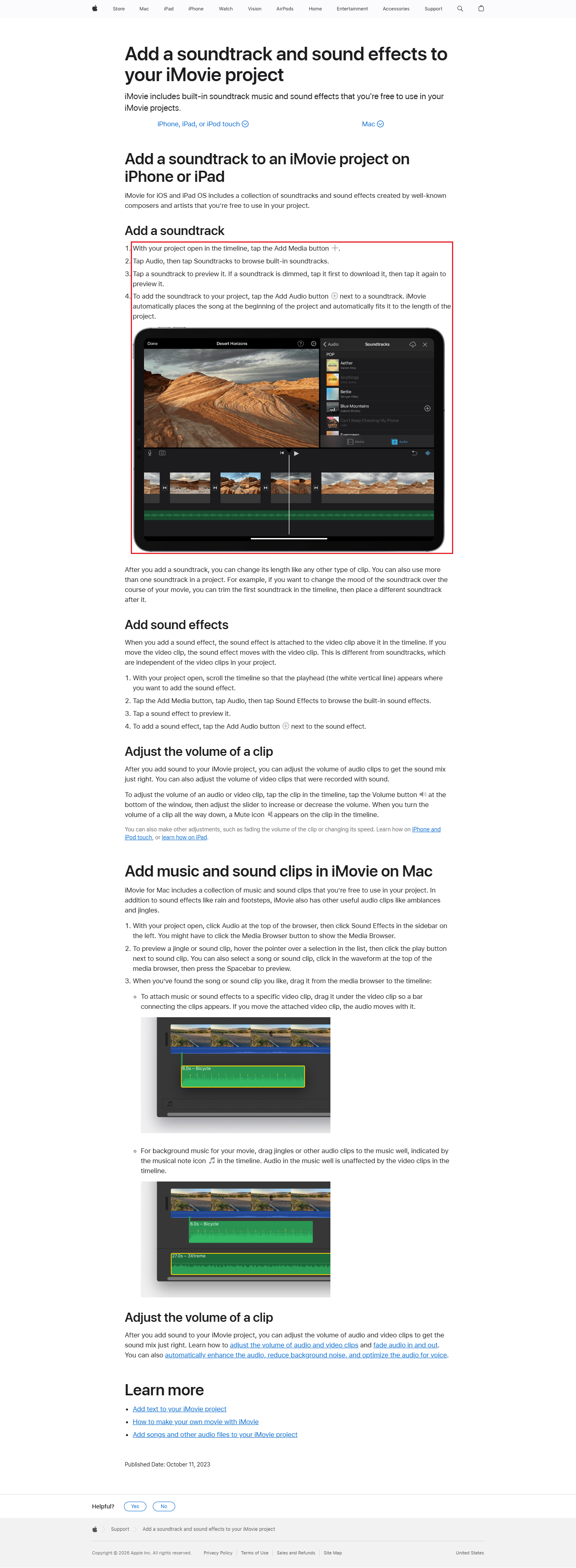
Tap Add Media, then tap Audio. Next, tap Soundtracks to browse iMovie’s built-in tracks.
Keep the source of the music clear as you work. The built-in soundtrack route and the My Music route are different choices; the own-song option appears below.
Step 3: pick a soundtrack and add it
Tap a soundtrack to preview it. If it needs downloading, tap it to download, then tap again to preview. Apple marks tracks needing a download with a Download button.
When you have chosen, tap the soundtrack, then tap Add Audio. Apple says its built-in soundtracks and sound effects are free to use in your iMovie projects.
Step 4: fit the music to your video
iMovie automatically places an added soundtrack at the beginning and fits it to the project length. By default, it loops background music to fit the movie.
Background music clips are green in the timeline. Our suggestion: play the ending as well as the opening before changing the music’s length. Judge whether the ending feels right with the final picture.
Step 5: set the volume
Tap the audio or video clip in the timeline, then tap Volume at the bottom of the window. Adjust the slider to raise or lower its volume.
Our suggestion: if the video has speech, listen for every word with the music playing. Turn the music down and listen again before sharing the result.
- Open your movie project in iMovie
- tap Add Media and then Audio
- pick a soundtrack and tap Add Audio
- fit the music to your video
- set the volume
Using your own songs
iMovie can use songs from the Music app that were synced to your device from a computer. In your project, tap Add Media, then Audio, then My Music. Preview the item before tapping it and Add Audio.
For a song bought from the iTunes Store, Apple requires you to own the copyright or have express permission from its holder. Buying the song and having permission to use it in a project are separate matters.
On Windows and Android
The controls change with the app. Use the device table to find the starting point rather than looking for iMovie’s buttons in another editor.
| Device | App | Where to start | Official note |
|---|---|---|---|
| iPhone | iMovie | Add Media, Audio, Soundtracks | Some soundtracks need downloading |
| Windows | Clipchamp | My media for your audio file; Content library then Music for stock tracks | Once on the timeline, audio can be moved, split or trimmed |
| Android | Google Photos highlight video | Add Music | Downloaded music needs music and audio access in Settings |
Source: Apple iMovie, Microsoft Clipchamp Support and Google Photos Help, read 5 November 2026.
In Clipchamp, drag an audio file from your device into My media, then add it to the timeline. For stock music, open Content library, click Music and choose a mood or genre. Use the + button to add a track.
If a track will not load in Clipchamp, check that its file type is a supported audio format. For downloaded music in Google Photos, allow music and audio access for the app in Settings.
Music rights
Apple says iMovie’s included soundtracks are free to use in a project. Its rule for purchased iTunes Store songs requires copyright ownership or express permission. Google’s accompanying music is for personal, non-commercial use only.
(Our suggestion) For a business video, use a soundtrack you have the rights to. Keep the permission with your project notes.
Our example: a cafe music plan
Our example (illustrative, not a real client).
Copper Kettle Cafe wants music under a short clip of coffee being poured. Our suggestion is to keep the sound gentle enough to hear the pour.
- Clip: a 20-second view of making and serving a coffee.
- Music source: an iMovie built-in soundtrack.
- Start: the beginning of the project, where iMovie places the soundtrack.
- Volume: our suggested starting point is low; listen before making it louder.
- Review: listen for the pour and any speech, then watch the final picture with the music.
- Sharing plan: send a preview to the colleague approving the cafe’s post.
For a clip that compresses a longer process, see making a time-lapse video.
Frequently asked questions
Why does the music repeat?
By default, iMovie loops background music to fit the movie length.
Can I use a song I bought?
Apple requires copyright ownership or express permission to use a song purchased from the iTunes Store in a project.
Where is the volume control?
Tap a clip in the iMovie timeline, tap Volume at the bottom of the window, then adjust the slider.
Sources
Maker instructions read 5 November 2026.
Published · Updated