VoiceStudio vs ElevenLabs: A Local ElevenLabs Alternative
VoiceStudio is a free, open-source app that clones and creates voices on your own computer, with no account and no usage meter. ElevenLabs is a cloud service with monthly plans that come with credits.
So the choice depends on what you need. Pick VoiceStudio for private, local voice work and testing on your own machine. Pick ElevenLabs when you need a paid commercial licence and nothing to install. The catch: VoiceStudio's default voice model is licensed for non-commercial use only.
How we compared
We read the official pages and files for both tools on 28 October 2026: the VoiceStudio v0.5.7 release page, its licence notice, install guides and model licence list on GitHub, and the VoiceStudio and ElevenLabs website pages for pricing, licence and voice cloning. We did not install either tool, record a voice or test the sound quality, so this page makes no claims about how good or how fast either one sounds.
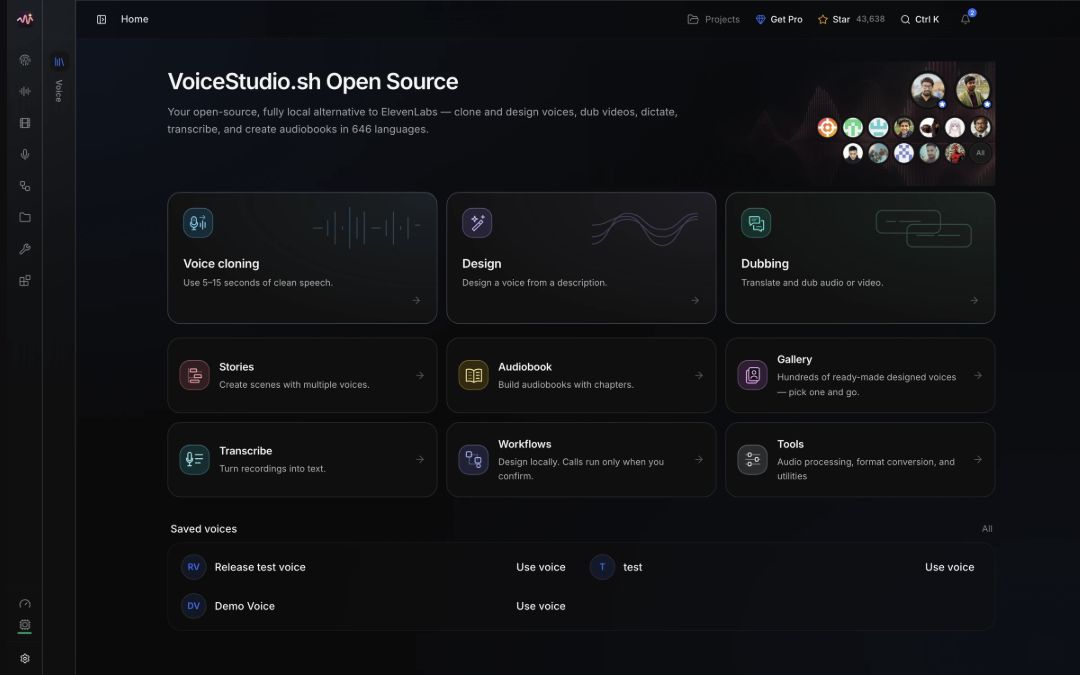
Voice cloning is only one part of the app. VoiceStudio's README says it can clone, design, dub, dictate, transcribe and narrate in 646 languages. In the image above, even the Voice cloning card repeats the advice to use 5–15 seconds of clean speech.
The side-by-side snapshot (checked 28 October 2026)
This table shows what the official pages said on 28 October 2026. Before you pay, open the live pricing pages. Three ElevenLabs cells come from VoiceStudio's own comparison table, which VoiceStudio says was sourced from public pages and checked on 4 Oct 2026; they are marked "as VoiceStudio's table puts it".
| What you compare | VoiceStudio (free app, v0.5.7) | ElevenLabs (cloud service) |
|---|---|---|
| Where the voice is made | On your own computer or phone | In ElevenLabs' cloud (as VoiceStudio's table puts it) |
| Account | None needed | An account for the web (as VoiceStudio's table puts it) |
| Your recordings | Stay on your device unless you say yes | Uploaded (as VoiceStudio's table puts it) |
| Price | Free and open source (AGPL-3.0) | Free plan at $0 a month; Starter at $6 a month |
| Usage limit | No usage meter | Free: 10k credits a month; Starter: 30k credits a month |
| Voice cloning | Voice, then From audio, with 5–15 seconds of clean speech | Instant Voice Cloning starts on the Starter plan |
| Paid or client work | The app is allowed for work, but the default voice model is non-commercial | A Commercial License starts on the Starter plan |
| VoiceStudio on your computer | Windows, Apple Silicon Macs and Linux; Intel Macs get the app screen only | Nothing to install, since it runs in the cloud |
What each one costs
VoiceStudio's open-source app costs nothing. Its website says it runs "on your own machine, with no account and no usage meter."
VoiceStudio also lists a paid Pro build at $99 per user a year, and a Lifetime seat at $299 per user, paid once. On 28 October 2026 both were marked "Coming soon", so you could not buy them yet. You do not need Pro to use the app at work: the Pro page marks "Use at work or for money" as allowed in both the free app and Pro.
ElevenLabs works on monthly plans that come with credits:
- Free: $0 a month, with 10k credits a month.
- Starter: $6 a month, with 30k credits a month. It adds a Commercial License and Instant Voice Cloning.
- Creator: $22 a month, with 121k credits a month. It adds Professional Voice Cloning.
Keep two things in mind. First, a $1 first month for Starter was a time-limited offer, listed to end on 1 November, so do not plan around it. Second, ElevenLabs says its prices exclude all taxes, levies and duties, so your final price at checkout can be higher.
Can you use the voices for paid work?
This is the part that decides most cases. With VoiceStudio, the app and the voice model have separate licences.
The app itself is free software under the AGPL-3.0 licence, and its licence notice says this includes commercial and internal business use of the application. VoiceStudio's licence page adds that commercial use alone does not require buying a separate app licence, but model, dependency and output terms must be reviewed separately.
The voice model is where the limit sits. VoiceStudio's default model is OmniVoice from k2-fsa. Its licence notice says the model card lists the code as Apache-2.0 and the pretrained weights as CC-BY-NC. NC means non-commercial. VoiceStudio's own website says it plainly: the OmniVoice pretrained model is noncommercial.
Paying does not change that. The licence notice says a commercial licence for VoiceStudio's own code does not replace the model's terms, and the Pro page lists speech model licences as "Separate" for both the free app and Pro. The project's model licence list also says no model record is currently marked as cleared for commercial use.
The app reminds you too. In v0.5.7, models without a plainly commercial licence, including the default OmniVoice model, ask you to accept their licence once in the Model Catalogue.
ElevenLabs is simpler on this point: its pricing page lists a Commercial License as one of the things Starter adds over the Free plan.
What this means for you: VoiceStudio with its default model fits personal projects, practice and private tests. For client work or paid ads, either check that the exact model you use allows commercial use, or use a paid ElevenLabs plan.
Voice cloning: how much audio and whose voice
In the VoiceStudio app, you open Voice and choose From audio. VoiceStudio's guide says to start with 5–15 seconds of clean speech from one speaker, and to avoid music, echo, clipped audio and long silence.
The engine notes say something slightly different, so keep the two apart. For the OmniVoice engine, 3–10 seconds is described as the sweet spot. If you also type the exact words of your clip into the transcript box, the clip is limited to 20 seconds.
Whose voice matters more than how long. VoiceStudio's README says to clone a voice only with its owner's permission. Its guide asks you to get clear consent, protect the recording and the saved voice, and say that audio is synthetic where appropriate. The simplest safe test is your own voice.
A short sample line you can read for your own reference clip
Today I am testing a clear and natural voice. I am speaking at my normal speed, with a steady tone and a little friendly energy.
We wrote this line as a plain reading sample. We have not tested it in either tool, so treat it as a starting point, not a proven script.
What your computer needs
VoiceStudio v0.5.7 has installers for Windows, Apple Silicon and Intel Macs, and Linux (AppImage, deb and the Snap Store). Before you download, check these limits:
- Intel Macs cannot run the part of VoiceStudio that makes the voices. They get the app screen only, and first-run setup stops before downloading anything.
- Apple Silicon Macs need macOS 13.3 (Ventura) or newer.
- Disk space: the install guides suggest about 10 GB free. The v0.5.7 release says small models can install with as little as 2 GB spare, and setup only warns below 10 GB instead of blocking.
- No graphics card is needed. The README says the app is fully usable on the processor (CPU), just slower.
- Windows installers are not code-signed yet, so Windows SmartScreen may show a warning.
The app also asks before it downloads any model. None of this applies to ElevenLabs: VoiceStudio's own comparison table lists ElevenLabs Cloud as running in "their cloud", not on your machine.
VoiceStudio v0.5.7 also added preview phone apps for iPhone and Android that run models on the phone itself. They are previews, so expect rough edges.
The VoiceStudio workflow, step by step
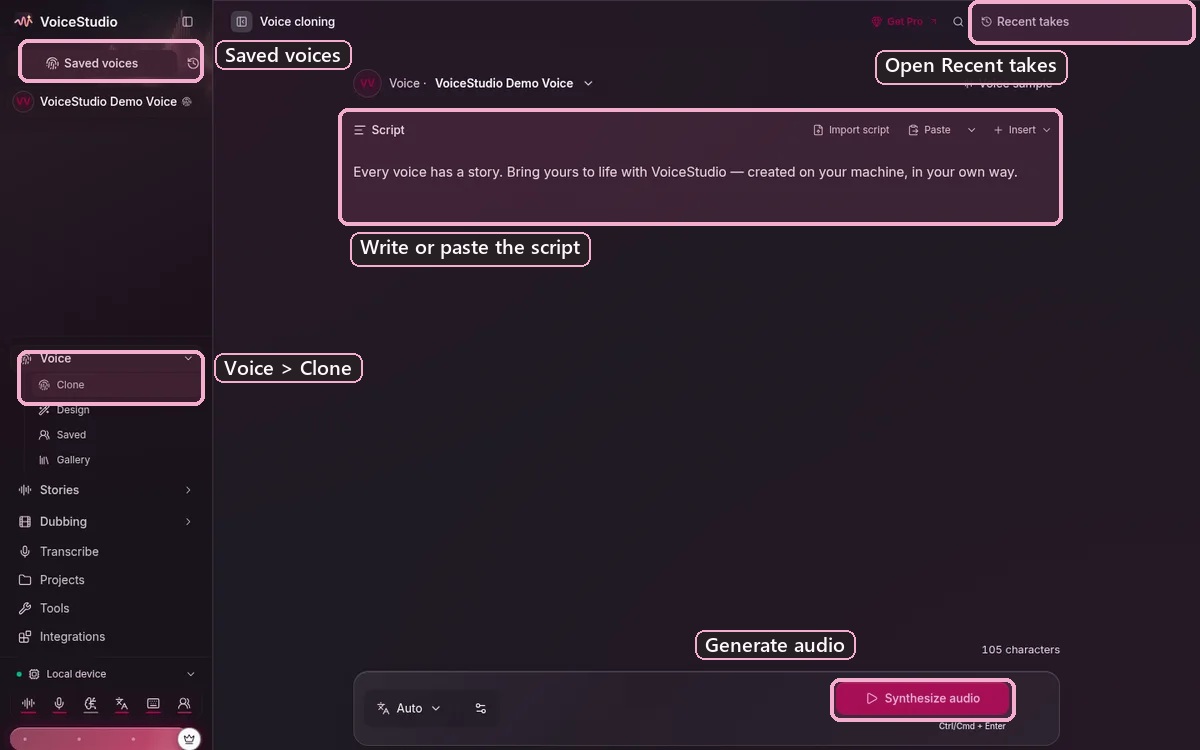
These steps follow VoiceStudio's official docs. The pictures are the developer's product images with numbered labels added in imaPRO's beginner guide. They are not our own test, so read each caption to see which version a picture shows.
Step 1: Download the installer
Get VoiceStudio from the official v0.5.7 release page on GitHub. It lists installers for Windows x64, macOS (Apple Silicon and Intel) and Linux.
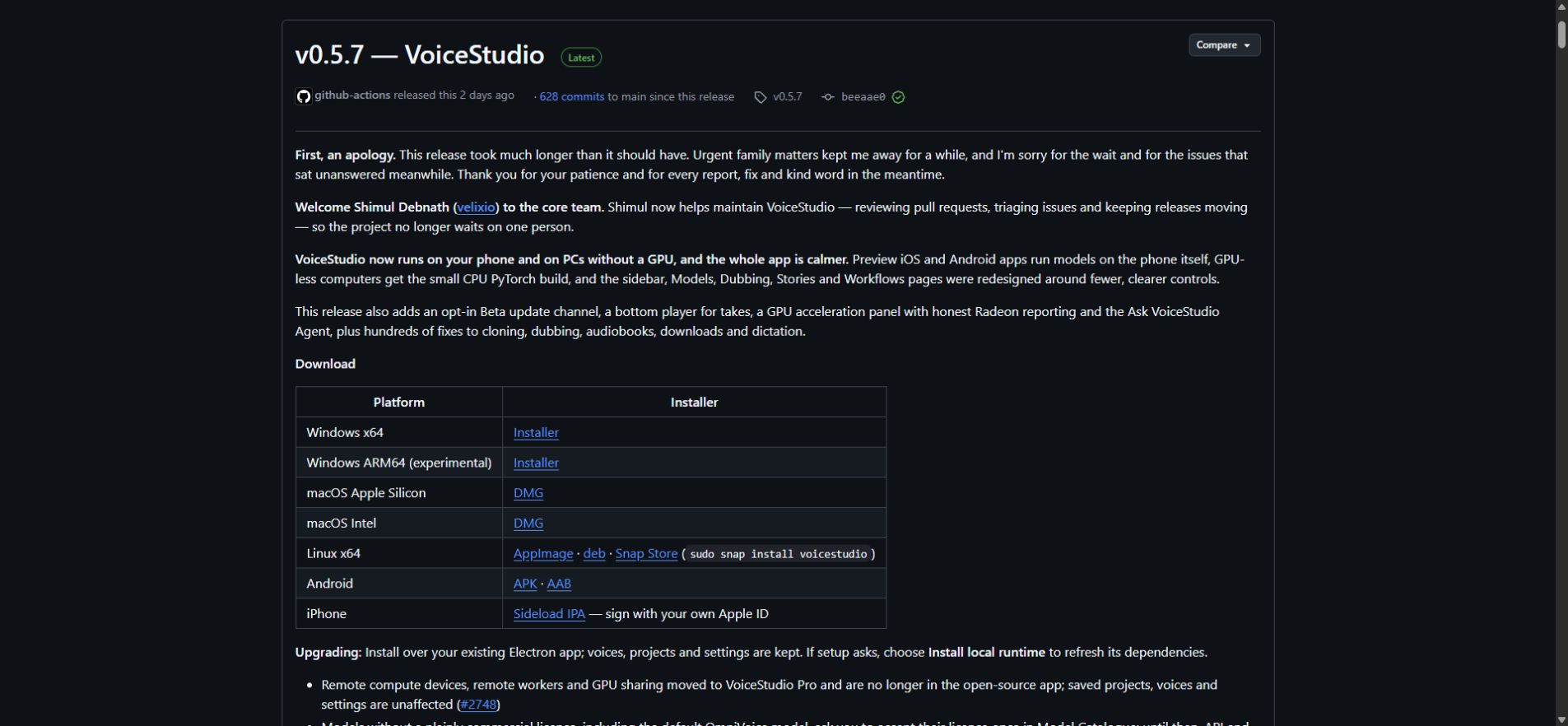
Pick the file for your computer:
- Windows PC (x64): the Windows x64 Installer.
- Mac with Apple Silicon: the macOS Apple Silicon DMG.
- Linux: AppImage, deb or the Snap Store.
- Intel Mac: a DMG is listed, but it gives you the app screen only, without local voice making.
Step 2: Let the app set up, then pick a model
The app asks before it downloads any model. Before you accept a model's licence in the Model Catalogue, read it, as explained in the licence section above.
Not every model can clone. If the one you pick can't, the app says so and suggests Voice design or a model that clones.
Step 3: Add your reference clip
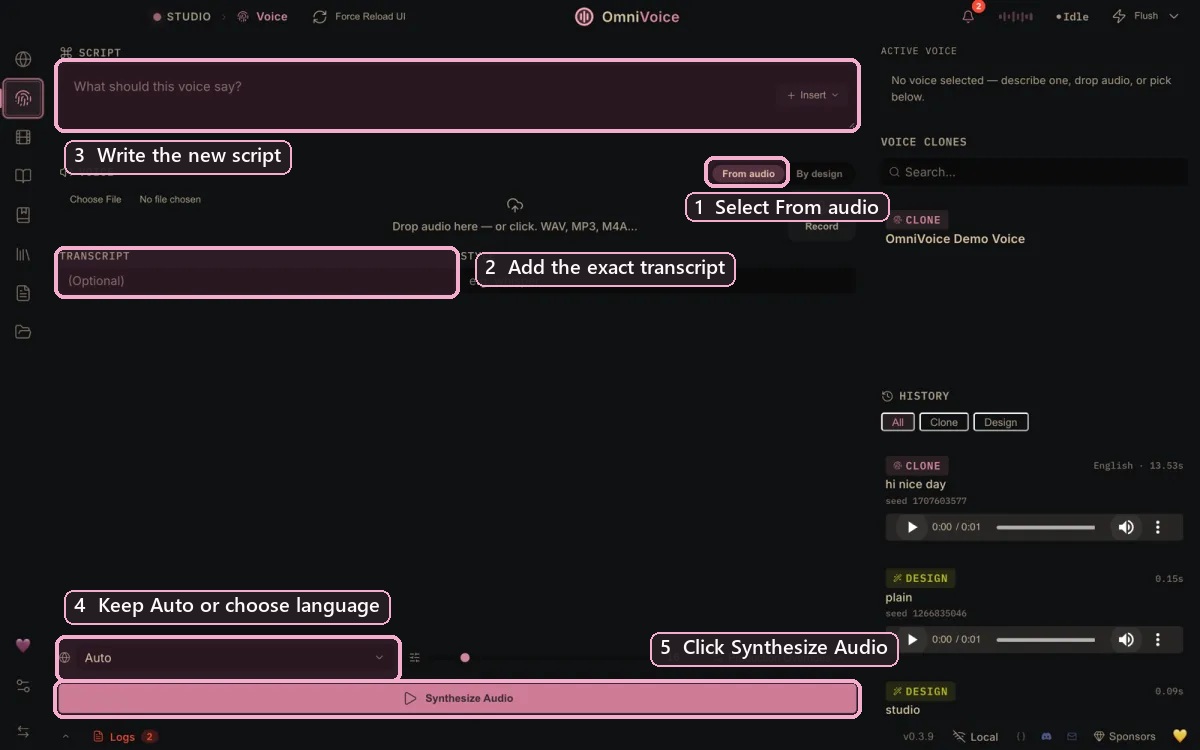
Open Voice and choose From audio. Then drop in an audio file, choose Upload, or record directly in the app.
- Use 5–15 seconds of clean speech from one speaker.
- If the panel offers Transcript, type the exact words spoken in the sample.
- Use your own voice, or a voice you have clear permission to use.
Step 4: Write the new words and generate
Type the new words in Script. Choose the spoken language or keep Auto. Then select Synthesize Audio.
- Keep the first test short and plain.
- VoiceStudio's guide says to adjust style or production overrides only after a plain test succeeds.
Step 5: Check the result and save the voice
Listen to the result and compare identity, pronunciation, noise and pacing. If it sounds right, choose Save as profile so the reference stays available in future sessions.
VoiceStudio's guide says saved output stays in History, and production work appears in Projects. For saving audio files, check the official voice cloning guide.
Which one should you pick?
This is our view, based on the facts above:
- Pick VoiceStudio if you want to try voice cloning without an account or monthly bill, keep your recordings on your own computer, and use the voices for personal projects.
- Pick ElevenLabs if you make voiceovers for clients or ads and want the commercial licence spelled out in your plan, or if your computer is an Intel Mac.
Making faceless Reels? The voice is only half the job. Our paper-cut animation guide with Claude and invideo covers the picture side.
When we test a tool ourselves, as in our guide to making a game with Gemini, we show our own screenshots. This comparison is different: it is built only from official pages and files, dated 28 October 2026.
Frequently asked questions
Is VoiceStudio really free?
Yes, the open-source app is free, with no account and no usage meter. A paid Pro build is listed, but it was marked "Coming soon" on 28 October 2026.
Can I use VoiceStudio voices for client work?
Check the model first. The app may be used at work, but the default OmniVoice model's pretrained weights are CC-BY-NC, which means non-commercial.
Does my audio leave my computer with VoiceStudio?
Not by default. The README says nothing leaves your device unless you say yes.
Can I run VoiceStudio on an Intel Mac?
Only the app screen. Intel Macs cannot run the local part that makes the voices, so use an Apple Silicon Mac, a Windows PC or Linux instead.
How long should my voice sample be?
VoiceStudio's guide says 5–15 seconds of clean speech from one speaker. Use your own voice, or a voice you have clear permission to use.
Sources
- VoiceStudio v0.5.7 release (GitHub)
- VoiceStudio README (GitHub)
- VoiceStudio licence notice (GitHub)
- VoiceStudio: OmniVoice engine notes (GitHub)
- VoiceStudio: install on macOS (GitHub)
- VoiceStudio: model licence inventory (GitHub)
- VoiceStudio website
- VoiceStudio: official home screen image
- VoiceStudio: License
- VoiceStudio: Pro
- VoiceStudio docs: Clone a voice
- ElevenLabs: Pricing
The voicestudio.sh and ElevenLabs pages were read through a dated copy of their text taken on 28 October 2026.