Bahrain finance guides
Fawri and Fawri+ in Bahrain: transfer timing and service differences
By Gaurav Agarwal · Sources checked 6 October 2026
Fawri+ is near real time with a published BHD 3,000 daily cap per account; Fawri credits in scheduled sessions, now including weekends and public holidays. Confirm the actual recipient credit for your transaction.

Jump to a section
- 1. Check whether the transfer was Fawri or Fawri+
- 2. Read the current Fawri settlement schedule
- 3. Check the Fawri+ daily limit and your bank’s controls
- 4. Check the fee attached to your account and channel
- 5. If the transfer is pending, check before sending again
- 6. Separate a wrong recipient from fraud or a pending transfer
- 7. Escalate an unresolved service complaint with a clear record
Fawri+ is Bahrain’s near-instant transfer service; Fawri uses scheduled settlement. BENEFIT currently describes Fawri+ as available around the clock, with transfers within 30 seconds and a daily limit of BHD 3,000 per account. Fawri has separate crediting windows, including a morning session on weekends and public holidays.
Checked: 6 October 2026. Use the service name on your receipt, the submission time and your bank’s confirmation to assess a transfer. A published service speed does not prove that a particular payment has reached the recipient.
1. Check whether the transfer was Fawri or Fawri+
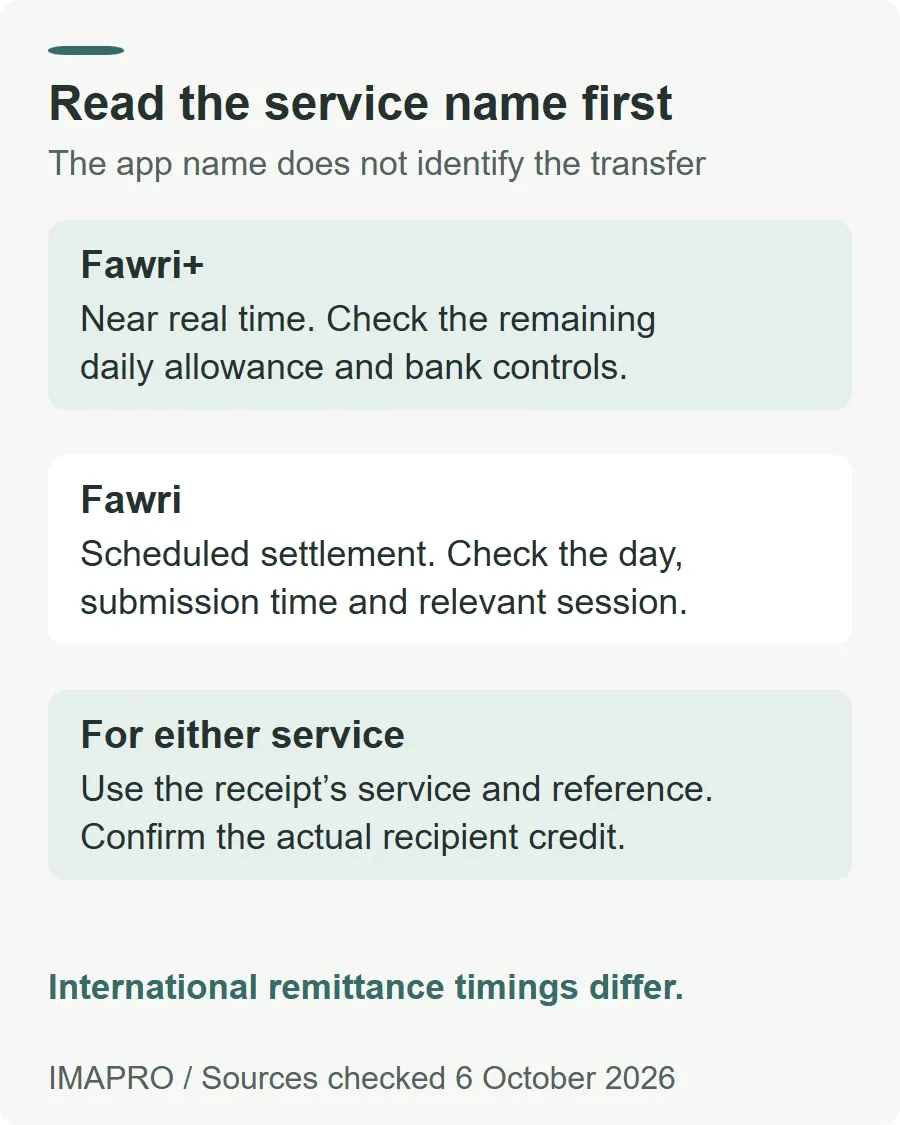
The plus sign changes the service. Both can appear inside a banking app or BenefitPay, so the app name alone is not enough. Read the transfer type on the confirmation or transaction record before looking up a waiting time.
| Question | Fawri+ | Fawri |
|---|---|---|
| How does it move? | Near real time. | Deferred settlement in scheduled sessions. |
| What amount does BENEFIT advertise? | Up to BHD 3,000 per account per day. | Any amount at service level; check your bank’s channel limit. |
| What should you check? | Remaining daily allowance and any channel restriction. | Submission time, day type and applicable settlement session. |
Sources: BENEFIT’s Fawri+ description and Fawri service page. These are local transfer services; do not apply their timings to an international remittance just because the payment was started through the same app.
2. Read the current Fawri settlement schedule
BENEFIT publishes the following Fawri windows. Times below use its local Bahrain service schedule, written in 24-hour format.
| Transaction initiation window | Published credit or settlement timing |
|---|---|
| Business-day window: previous business day 14:25 to current business day 07:45 | Credit around 10:00. |
| Business day: 07:45 to 11:45 | Credit around 14:00. |
| Business day: 11:45 to 14:25 | Credit around 15:30. |
| Weekend or public holiday: before 08:05 | Credit at 10:20 that day. |
| Weekend or public holiday: after 08:05 | Settlement on the next calendar day. |
The official schedule qualifies crediting times by successful interbank settlement. Ask your bank which session applies if you submitted at a cutoff or during a transition between a holiday and a business day.
Older explanations saying Fawri only settles on business days are incomplete. BENEFIT’s weekend and public-holiday announcement, dated 2 October 2025, says the additional morning session began on 3 October 2025. That expansion does not make Fawri an instant service.
3. Check the Fawri+ daily limit and your bank’s controls
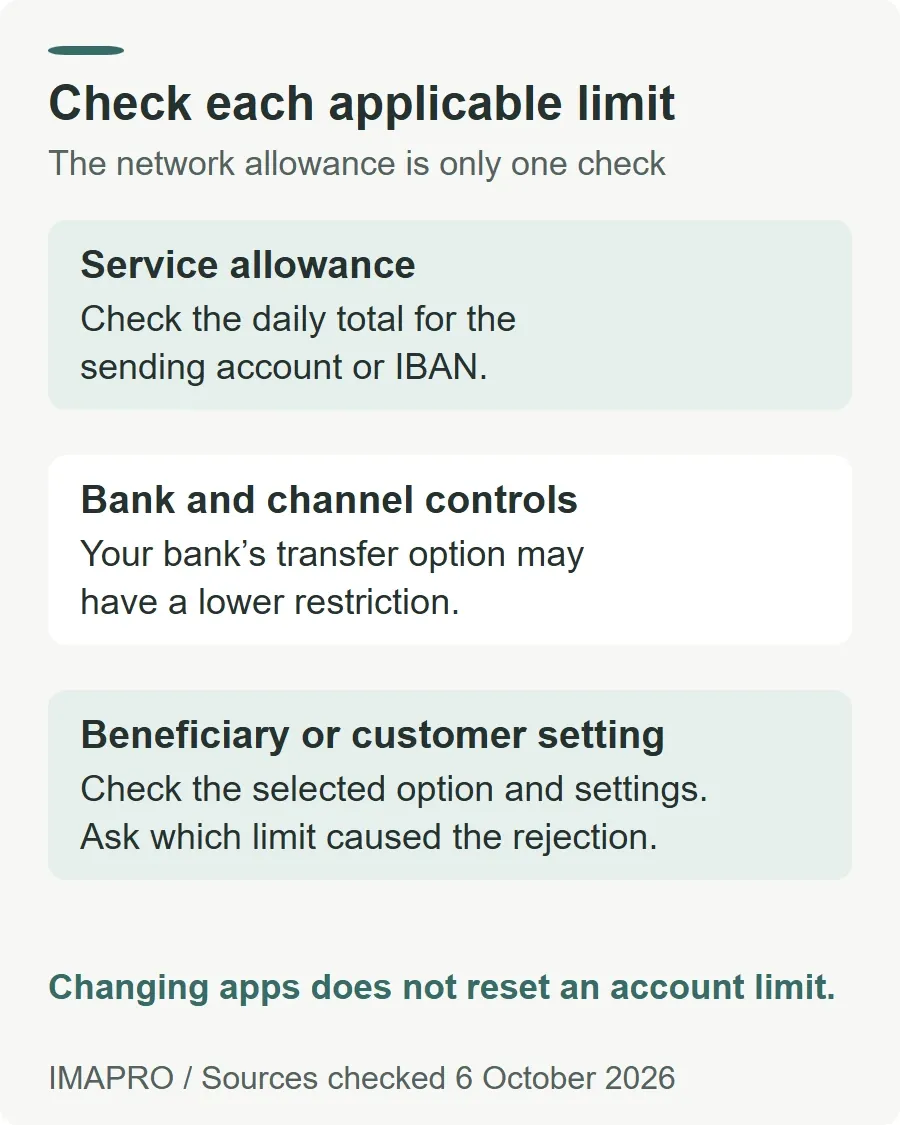
The current Fawri+ limit is BHD 3,000 per account per day. BNP Paribas’s dated notice records the increase from BHD 1,000 effective 21 July 2025. That explains why older material may show a lower network allowance.
The unit matters: KFH Bahrain’s Fawri+ form describes a total daily limit per sender IBAN. Check what you have already sent from that account before attempting another payment. Treat the allowance as a daily total, not a fresh BHD 3,000 for each transaction. Switching apps does not create a new allowance for the same sending account.
Bank-specific transfer types can have lower restrictions. For example, BBK’s mobile-transfer tutorial describes a BHD 100 daily limit for its one-time-transfer option to a new IBAN or mobile number. It separately describes registered beneficiaries. This is a BBK channel example, not a replacement for the network’s BHD 3,000 ceiling.
Some banks also provide customer transfer settings. Standard Chartered Bahrain’s digital guide describes Settings, then “Change Funds Transfer Limits”, where the customer selects a transfer type and submits a new limit. The public guide does not specify a Fawri+ ceiling for that setting. Check the options available for your account; a bank setting should not be read as permission to exceed the service limit.
If a payment is rejected for its amount, ask the bank which limit was reached: the service allowance, your channel limit or the beneficiary option. For a larger transfer, ask which supported route fits the amount and deadline. Do not assume a higher amount will automatically be sent using Fawri.
4. Check the fee attached to your account and channel
Here is a dated bank example, rather than a universal fee promise. The BisB retail fee schedule available when checked lists:
- Fawri+ of BHD 100 or less: free.
- Fawri+ above BHD 100 and up to BHD 3,000: BHD 0.110.
- Fawri other than salary payments: BHD 0.110 per transaction.
These figures are from the schedule’s remittance table on PDF page 4. The document states that applicable fees include VAT. Confirm the charge shown for your own bank and transaction before authorising it; account packages, payment types and future tariff changes can affect what applies.
Keep the fee separate from the amount the recipient should receive. If your statement shows a different debit, compare the transfer amount and fee line before treating the difference as missing money.
5. If the transfer is pending, check before sending again
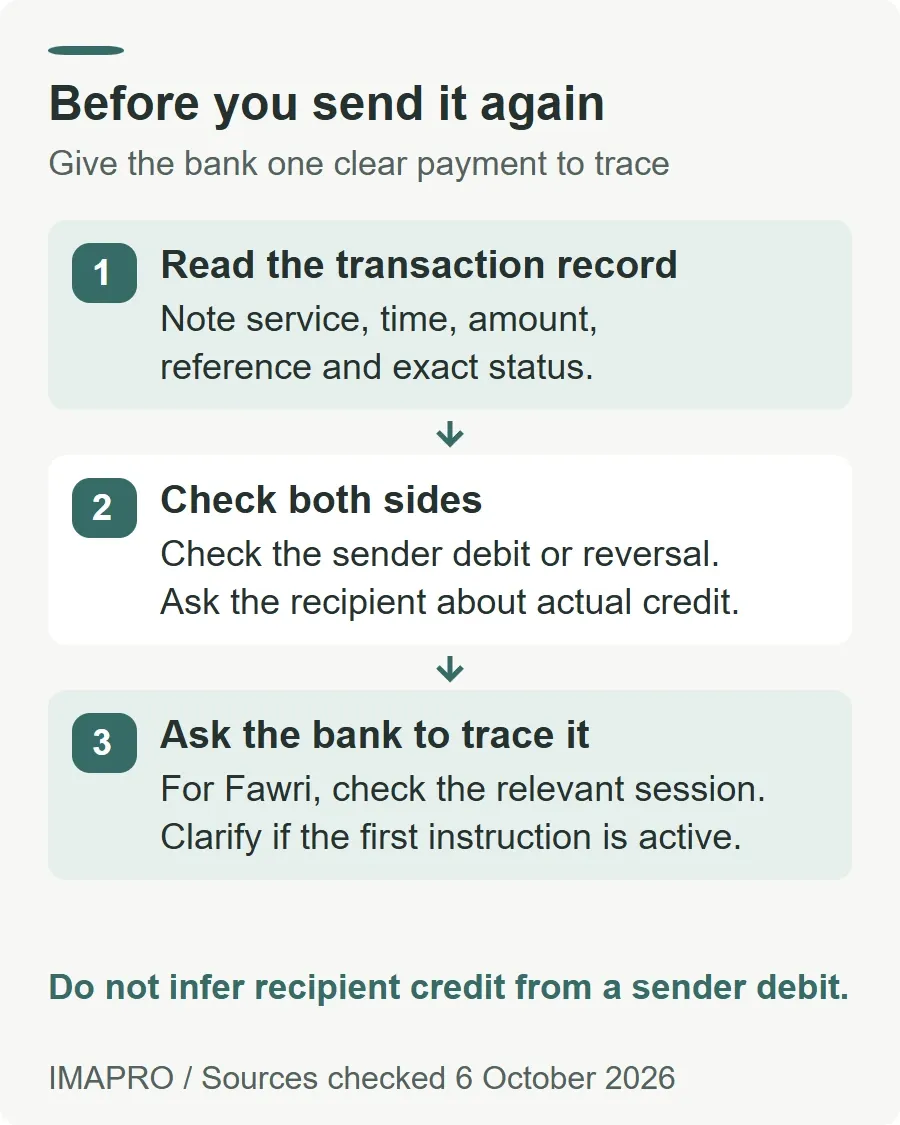
Use this sequence to give the bank a clear problem to investigate:
- Open the transaction record. Note the service, amount, exact time, reference and displayed status.
- Check the sending account. Record whether a debit appears and whether any reversal has appeared.
- Ask the recipient to check the receiving account. Confirm the intended account and actual credit, rather than relying only on a notification or screenshot.
- Compare the timing with the correct service. For Fawri, identify the relevant session. For Fawri+, report an unexpected delay to the sending bank.
- Avoid an unverified retry. Ask whether the first instruction is still active before creating another payment.
These are practical checks, not a diagnosis of the delay. The BenefitPay terms say transactions depend on bank verification and approval, and can be affected by service disruption or compliance checks. They also require users to verify that instructions were received and processed.
A confirmation screen records what the app reports. If the recipient cannot find the credit, ask the bank to trace that specific reference and explain its status. Do not infer recipient credit solely from the sender’s debit.
6. Separate a wrong recipient from fraud or a pending transfer
For a wrong completed BenefitPay transfer, contact the sending bank promptly with the transaction reference. Describe exactly what happened. An incorrect recipient, a payment induced by a scam and a transaction you did not authorise need different explanations.
| What happened? | What to report | First action |
|---|---|---|
| You approved the wrong recipient or amount | Explain the input error and identify the affected reference. | Ask the sending bank what recovery assistance is available. |
| You approved a payment after being deceived | Explain both the approval and the suspected deception. Keep the messages or payment request. | Contact the bank urgently and report suspected fraud through the official police route below. |
| You did not authorise the transaction | State that clearly, including any suspected device or account compromise. | Use the bank’s emergency channel and contact BENEFIT immediately. |
| The intended recipient has not received it | Record the app status, debit and expected recipient credit. | Use the pending-transfer checks and ask the bank to trace it before retrying. |
This table helps describe the incident; it does not determine liability. The BenefitPay terms direct wrongful completed transactions to the bank and say completed transfers cannot be reversed. They allow a cancellation request before execution to be considered where practicable, while amendments are not accepted. A pending screen alone does not establish that cancellation is still possible.
For a scheduled transfer, the same page’s Scheduled Transfers section describes requesting a refund from the beneficiary or assistance from the sending bank. It also says the app does not provide personal-transfer chargeback, reversal or refund services. Neither route promises recovery.
For suspected account misuse, BENEFIT’s emergency instructions give +973 13300300. The Ministry of Interior’s fraud notice of 10 February 2026 identifies 992 and the MyGov application for prompt fraud reporting. A police report and a bank recovery request serve different purposes; retain both references.
Save the amount, date, time, service, transaction reference, recipient identifier used and relevant communications privately. Use official support channels. Do not publish account details, identity documents, passwords or one-time codes. Before future payments, verify the IBAN or linked mobile number: the terms warn that a recipient name alone may not be relied upon.
7. Escalate an unresolved service complaint with a clear record
After the urgent report, keep a dated record of the bank’s response and the action requested. Ask whether the instruction completed, what assistance was requested from the receiving bank, and what remains unresolved. A case number confirms a report, not a refund.
Use the bank’s formal complaints team if its handling remains unresolved. The CBB’s complaints procedure for banks and financial institutions calls for acknowledgement within 5 business days and a written response within 4 weeks. These are complaint-handling periods, not transfer recovery deadlines. Do not wait for them before reporting suspected fraud or requesting urgent assistance.
If the response is unsatisfactory, that procedure allows escalation with the institution’s written response through CBB’s website, Tawasul or in person. The CBB consumer-information page explains that it reviews possible breaches of regulatory requirements. Escalation does not guarantee compensation.
For other local payment and borrowing topics, browse the Bahrain finance guides.
General information only, not personalised financial or legal advice. This guide describes published services and terms checked on 6 October 2026. It is not a live outage monitor, a test transfer or a guarantee of an individual transaction’s arrival time.