Official process guide
LMRA Visa Check: Bahrain Work Permit Status
By Gaurav Agarwal · Checked 29 September 2026
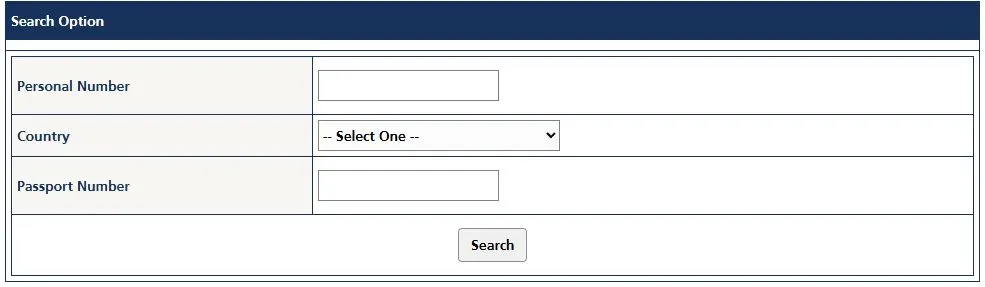
For an LMRA visa check, open the official commercial-sector form. Enter your Personal Number (CPR), select your Country, enter your Passport Number and choose Search. Domestic workers use the separate domestic-worker form.
Jump to a step

01Choose the right LMRA service
LMRA calls this lookup View Expatriate Employee Data. Choose the version that matches your employment category. The result shows the work permit’s status and validity, as LMRA describes it.
| Your task | Use this service |
|---|---|
| Check a commercial-sector employee's work permit | LMRA commercial-sector lookup |
| Check a domestic worker's work permit | LMRA domestic-worker lookup |
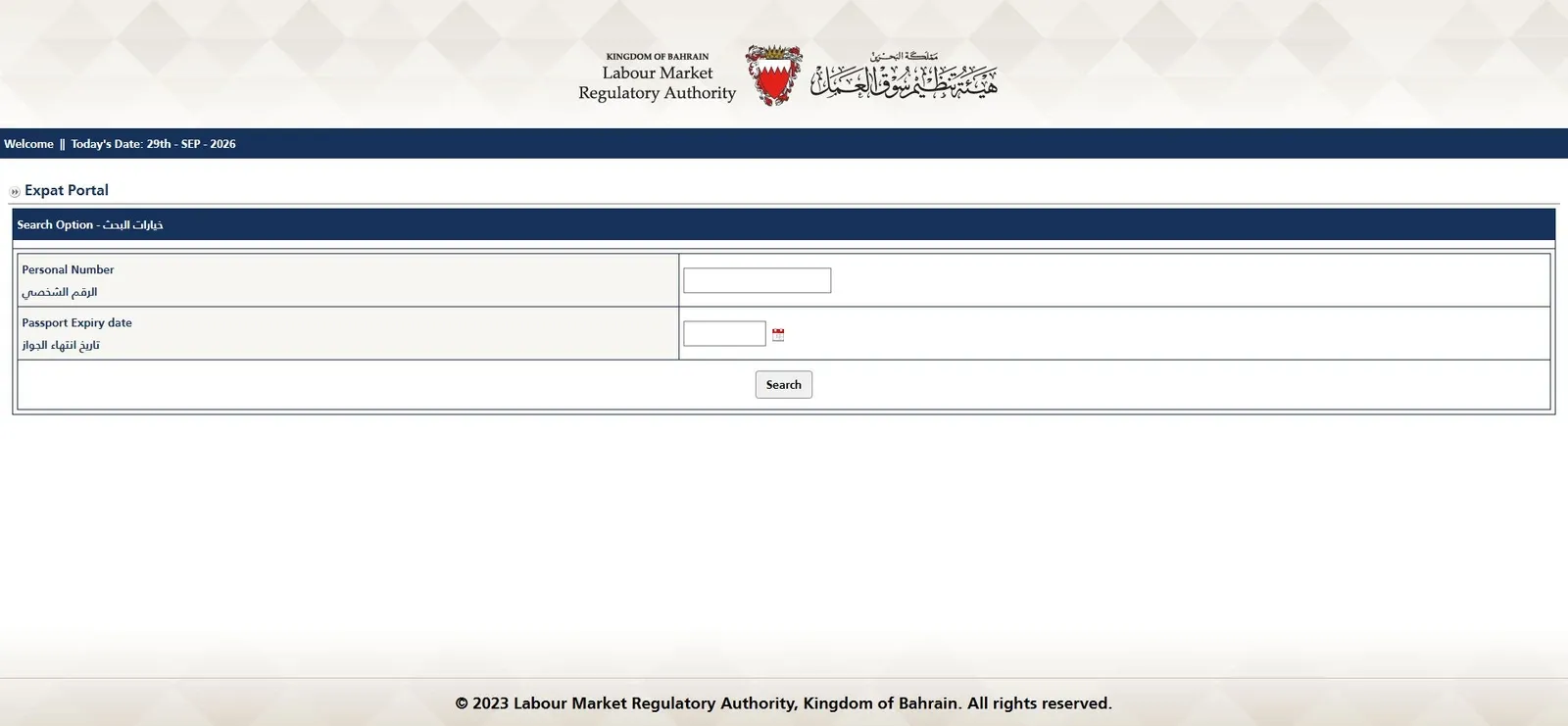
| Use LMRA's alternative Expat Portal | Expat Portal, with Personal Number and Passport Expiry date |
| Track a visit-visa application | NPRA's Bahrain Visa System, then Check Application Status |
The official Expatriate Employee services page lists the commercial lookup, domestic lookup and Expat Portal separately. A visit-visa application belongs to a different service; do not assume a result from one system answers a question about the other.
The employer applies for and renews a work permit; the worker can check its status here. If you are changing jobs, read LMRA’s Intention to Transfer service and its conditions before acting.
02What you need
Requirements and fee display checked: 29 September 2026. For the commercial or domestic lookup, have your CPR and passport details available to copy accurately.
- Personal Number: the worker's CPR/identity-card number.
- Country: select the worker's nationality from the menu.
- Passport Number: enter the passport number in the field bearing that name.
The lookup is free to use: there is no payment step or document upload.
You do not need to send documents to this website. Enter personal details only on the official LMRA service.
03LMRA visa check: step by step
- Open the correct form. Use the commercial-sector link above unless you need the domestic-worker service. Check the heading before entering details.
- Enter your Personal Number. This field is for your CPR number. It is separate from the Passport Number field.
- Select Country and enter Passport Number. Choose your nationality, then enter the passport number. If the page instead asks for Passport Expiry date, you are on the alternative Expat Portal described below.
- Choose Search. Review the status and validity information that the official service returns for your record. If it cannot find or display your details, use the checks in the troubleshooting section before drawing a conclusion about your permit.
04Expat Portal and MyGov alternatives
Expat Portal: CPR plus passport expiry date
LMRA's Expat Portal has a different entry screen. It asks for Personal Number and Passport Expiry date, followed by Search. Read the field labels: a passport number and a passport expiry date are different inputs.
MyGov: an official app route
Both LMRA lookup pages say the service is also available through MyGov using the Advanced Electronic Key (2.0). The official MyGov listing on bahrain.bh provides the app-store links and explains its eKey 2.0 sign-in.
Use that official listing to get the app.
05If your details or status do not look right
- The lookup cannot find your record: check the employment category, CPR, nationality and passport number against your own documents. A failed lookup is not, by itself, confirmation that a permit has been cancelled.
- You recently changed your passport: ask your employer or LMRA to confirm which passport details are held in your record if the current details do not return a match.
- You do not yet have a CPR number: these public forms ask for a Personal Number. Ask your employer for the application reference and contact LMRA about the appropriate way to check your application. Do not substitute someone else's CPR.
- The returned information raises a concern: keep the exact message and contact LMRA or your employer for clarification. Do not treat an incomplete result as confirmation that you are permitted to work.
LMRA's official contact page lists +973 17506055 for the Call Centre and +973 17103103 for Expatriate Services. It also lists [email protected] for expatriate work-permit enquiries and related transactions. Contact details checked on 29 September 2026. LMRA lists working hours as 7:30 AM to 3:30 PM. For expatriate worker complaints or grievances, its contact page lists the 995 hotline and [email protected].
06If your permit is expired or still in progress
If the official result shows an expired permit, ask your employer or LMRA about the appropriate next step. LMRA has a separate Cancellation of an Expired Work Permit service that an expatriate worker can start through the Expatriate Services System. Its page lists an application form, proof of identity and a document explaining the reason for cancellation. Expiry does not mean cancellation has happened automatically.
If a new permit or renewal application is still in progress, confirm its position with your employer or LMRA. LMRA separately offers Cancellation of an In-Progress Application, also started through the Expatriate Services System. This is an application to cancel, not a status-check step. Its page lists the Expatriates Service Application Form as the required document. Do not assume an in-progress result tells you whether you may work.
07Common questions
Can I do an LMRA visa check with only my passport number?
The commercial and domestic forms checked for this guide ask for a Personal Number, Country and Passport Number. The Expat Portal asks for Personal Number and Passport Expiry date. None of these inspected entry screens is a passport-number-only lookup.
Do I need an eKey for the website form?
The public LMRA browser forms opened without an eKey sign-in during our check. LMRA specifically identifies Advanced Electronic Key 2.0 for the MyGov route.
Is this the same as downloading my residence permit?
This guide is about checking work-permit status. If your task is to obtain a residence-permit document, see our separate Bahrain residence-permit download guide.
08Official sources and check date
All factual service references in this guide were checked against these official pages on 29 September 2026. The page describes the public interfaces available on that date; follow the current official prompts if they change.
- LMRA commercial-sector work-permit lookup
- LMRA domestic-worker lookup
- LMRA Expat Portal
- LMRA Expatriate Employee services
- LMRA contact details
- LMRA expired work-permit cancellation
- LMRA in-progress application cancellation
- LMRA Intention to Transfer
- Bahrain National Portal: MyGov
- NPRA Bahrain Visa System