YouTube Agent Skill for Claude: How to Install and Use All 11 Skills
On this page
YouTube Agent Skill brings 11 tools for planning, scripting and reviewing videos into Claude. Add the plugin, then try /yt-script with one video idea.
Use the web or desktop setup if you work in Claude chat, or the two terminal commands if you use Claude Code. The skills prepare scripts, titles, edit notes, chapters and replies. You record, edit and upload the video.
About the screens in this guide. They are real screens from our practice session on 5 November 2026. The gold lines mark the control or the result to look at. The plugin was already installed in that account, so we opened the add-repository form, looked at it and cancelled it. The desk-cable tutorial used in the examples is teaching data. Its title, retention numbers, comments and figures are not real channel results.
Before you start
What you need
- A Claude account with plugins. Claude's help page says plugins are available on all paid plans (Pro, Max, Ultra, Team, Enterprise).
- For the full tests, Claude must be able to read files and run the bundled Python scripts. A chat that cannot run them can still write, but it cannot prove a score.
- Your topic, a transcript of your footage and, if you have them, your retention numbers. Share only files you have the right to use.
What you will have at the end: the plugin switched on, 11 commands in the / menu, and a first script with scored hooks.
Terms used in this guide
| Term | Meaning |
|---|---|
| plugin | A bundle of add-ons for Claude. This one holds the 11 skills. |
| skill | A set of written instructions Claude follows when you type its command, such as /yt-script. |
| marketplace | A list of plugins. Here, the GitHub repository is the marketplace. |
| transcript | Your video's speech as text with times. An .srt file is the common format. |
The pack is open source under the MIT licence. It is free, needs no signup and no API key, and connects to nothing. Your Claude plan, usage and limits are separate from the pack.
Install in Claude on the web or desktop
These steps follow the screens from our session. Claude's help page says the sidebar item that was called Customize now reads Plugins, so your menu may show either name.
Step 1. Open the Add menu
Open Customize (or Plugins) and select the Plugins tab. Choose Yours. If Youtube agent is already listed, go to step 3. If not, click Add.
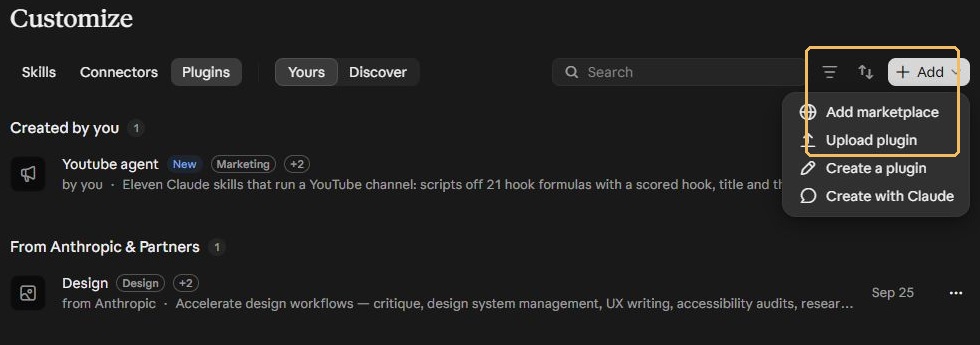
What you should see. a menu with Add marketplace, Upload plugin, Create a plugin and Create with Claude.
Step 2. Add the repository
Select Add marketplace, then Add from a repository. Type Jakeschincariol/youtube-agent-skill and choose the Use line that appears. Claude's help page says to enter a repository URL, or owner/repo for GitHub. Read any permission prompt before you accept it. Then sync the marketplace and add Youtube agent.
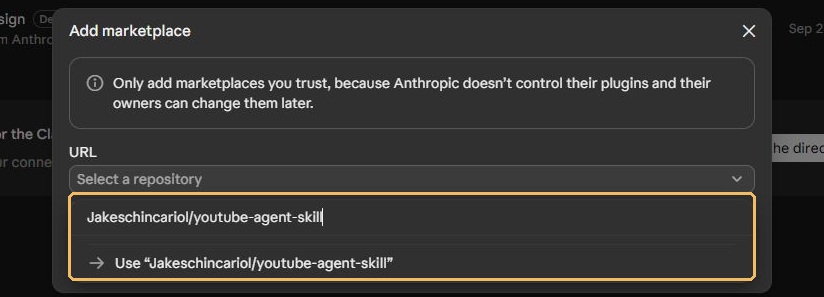
What you should see. a warning that says to add only marketplaces you trust, because Anthropic does not control their plugins and the owners can change them later. Adding a repository to this form is not the same as a finished install. Check the result in step 3.
Step 3. Check that the plugin is on
Open Youtube agent. Check the line under its name, then the blue switch. Open the Skills tab and confirm the list is there.
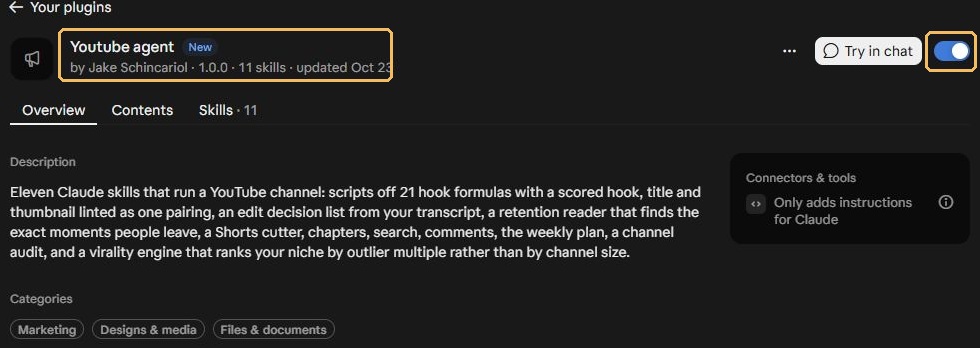
What you should see. "by Jake Schincariol", version 1.0.0, 11 skills, and the switch turned on. The page also says the plugin only adds instructions for Claude.
Step 4. Run a first test
Start a new chat. Type / (or click +) to see the skills from your plugins. Attach your topic and style notes, then run one small request first:
/yt-script Use START-HERE as my voice and topic. Write five hooks and a spoken script. Run the original hookscore.py if available. Show the actual score and the winning hook. If the tool cannot run, say so.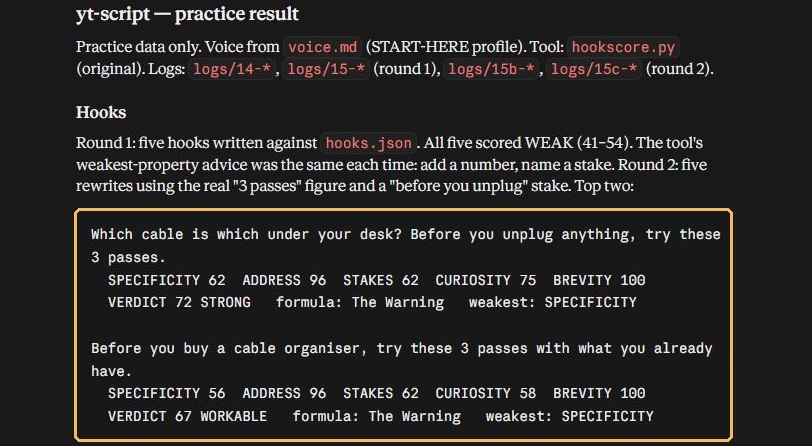
/yt-script result. The gold outline marks the two top hooks and their scores. Practice data only. Real screen, 5 November 2026.What you should see. the hooks with a score for each, the winner named, and a line saying which tool ran. In our practice run the first five hooks scored 41 to 54. After a rewrite, the top hook scored 72. If Claude gives a score and does not say which tool produced it, ask. A score with no tool behind it is only a writing suggestion.
Install in Claude Code
Claude Code has its own commands. We did not run these in our session, so they come from the project's README. Run them one after the other:
/plugin marketplace add Jakeschincariol/youtube-agent-skill
/plugin install youtube-agent
Then run /yt-script and ask it to report which files and tools it used.
| Route | What to do | What you get |
|---|---|---|
| Claude web or desktop | Add the repository from the Plugins page (steps 1 to 3) | The plugin and all 11 skills |
| Claude Code | The two /plugin commands above | The plugin and all 11 skills |
| One SKILL.md pasted into a chat | Paste the file at the top of the chat | Good for drafting. The six Python tools are lost. |
The README also shows two other ways. You can paste the repository link into Claude and ask it to install the skill. Or you can clone the repository and copy the yt-* skill folders into ~/.claude/skills/.
Set your creator voice
Every skill reads a voice file, so it is worth ten minutes. In Claude Code the file is ~/.claude/youtube/voice.md, and the project gives a template at templates/voice.md. In a chat, paste a short brief with your task. Ours was:
Audience: beginners and students.
Style: simple English, short sentences, one action at a time.
Avoid: hype, invented facts and unnecessary purchases.
Topic: tidy desk cables using what you already own.
Goal: a clear, roughly three-minute tutorial.
The voice file controls writing style. It does not clone your audio voice.
Compare all 11 skills
Pick the command for the task you’re working on. Each row shows what to give Claude and what to expect back.
| Skill | What to give it | What you get |
|---|---|---|
/yt-scriptwrite the script | your brief and one video idea. | five hooks built on 21 formulas, scored, then a spoken script with the retention beats marked. |
/yt-packagepair the title and thumbnail | the video promise, the script and your thumbnail text, here "3 SIMPLE PASSES". | ten title options, checked for cut-off, repeats and vague wording. |
/yt-editturn a transcript into a cut list | a timestamped transcript that matches your footage. | an edit decision list with timecodes. |
/yt-commentdraft replies | a list of comments, your style and any facts a reply needs. | the comments sorted into groups, reply drafts in your voice and a pin suggestion. |
/yt-planplan your week | the hours you have, what is already made and what matters most. | a schedule sized to your time. |
/yt-viralstudy what works in your niche | titles, views and channel names for comparable videos. | videos ranked by how far each beat its own channel's median, not by channel size. |
/yt-retentionfind where viewers leave | a retention export on a 0 to 100 scale and the matching transcript. | the opening loss, the biggest drops and one change to test. |
/yt-shortsfind the Shorts inside a long video | the final transcript and access to the footage. | ranked moments and, for the best, a new first line, on-screen text and framing notes. |
/yt-seowrite the upload wording | your confirmed title, the final transcript and the final chapters. | a description, tags and likely viewer queries. |
/yt-chaptersadd named sections | the transcript from your final edited export. | chapter times that follow YouTube's rules. |
/yt-auditpick one fix | recent titles, thumbnails, openings, upload history and analytics. | one main fix and a few things to keep. |
What we saw in the practice run
These results came from fictional desk-cable practice files. Open a command to see its output and the checks it still needs.
/yt-script write the script
Result. The first five hooks scored 41 to 54, a rewrite reached 72, and the script ran 293 words, about 1:57 at 150 words a minute.
Check. A hook score is a rule of thumb and does not predict views. A three-minute video still needs about a minute of hands-on footage.
/yt-package pair the title and thumbnail
Result. All ten titles scored 80 out of 100. The pick was "Tidy Your Desk Cables Without Buying Anything". A title that repeated "3 passes" was flagged for copying the thumbnail.
Check. The tool does not draw a thumbnail and cannot tell you which title gets more clicks.
/yt-edit turn a transcript into a cut list
Result. The tool found two gaps worth 7.10 seconds. Claude then added an intro detour and a retake, for 30.55 seconds cut in total and about 2:39 left.
Check. This is a list, not an edited video. The automatic filters missed a spoken filler and the retake, so watch the footage yourself.
/yt-comment draft replies
Result. Six comments became three questions, one correction, one piece of praise and one spam item. Five replies were drafted and none was sent.
Check. One draft needed us to confirm how a paper label was attached. Fill in such gaps yourself and never post a draft with a bracketed note left in it.
/yt-plan plan your week
Result. Five items fitted into an estimated six hours, and Short 3 was marked as the first to drop.
Check. The hours are estimates. Replace them with your own pace.
/yt-retention find where viewers leave
Result. The tool reported a 19.4% opening loss and two large drops, 14.9 points at 0:25 and 10.9 at 1:25. They sat next to the intro detour and the retake.
Check. Our practice file used 0 to 1 fractions, but the tool needs 0 to 100. We made a separate copy with every value multiplied by 100 and kept the original. The tool also flagged normal 0.9-point steps, and a matching time does not prove which line made viewers leave.
/yt-shorts find the Shorts inside a long video
Result. Five moments were ranked and three Shorts briefs written. The new opening lines scored 59, 53 and 52, so several still needed work.
Check. The skill does not cut or render clips, and a transcript cannot show whether a hand or product stays inside a vertical crop.
/yt-seo write the upload wording
Result. A description and 12 tags. Three suggested queries passed a check that their words appear in the title and opening description.
Check. That check is not a search test, a keyword-volume check or a ranking promise. The project itself says tags barely matter.
/yt-chapters add named sections
Result. 0:00, 0:12, 0:39, 1:41 and 2:52. The times stayed the same across repeat runs. The generated labels changed, so we rewrote them.
Check. These times belong to the uncut recording. After you apply your cuts, run the skill again on the new transcript.
/yt-audit pick one fix
Result. The main fix was the intro detour from 0:24 to 0:39. The three-pass structure and the title and thumbnail pairing were kept.
Check. We supplied no real thumbnails or upload history, so this was a partial teaching audit and not a review of a real channel.
From script to finished video
This part is yours. The skills do not render video, and no finished video came out of our test. Work in this order:
- Approve the script.
- Make a shot list.
- Record footage and audio.
- Apply the cuts you reviewed.
- Add captions and graphics.
- Export, then watch the whole file from start to end.
For our desk-cable example, each script part maps to one thing to record:
| Script part | What to record | Check |
|---|---|---|
| Hook | The messy cable corner. Show the problem before you explain it. | The opening matches the title. |
| Label | Trace and label one cable in a close shot. | The label and your hand are readable. |
| Route | The clear path, loose loops and a reachable switch. | No tight bends and no chair-wheel snag. |
| Check | Test device reach and chair movement. Show the same desk before and after. | The result is real and visible. |
If you want animated graphics or cut-outs for the video, you can build them in an editor. Our guide to paper-cut animation with Claude and invideo shows one way to do that.
Record your own example, or use media you have permission to use. Apply only the cuts you have reviewed, and keep any speech needed for safety or meaning.
Captions and chapters from the final cut
Times move when you cut, so work from the finished edit and keep this order: final edit, final transcript, final chapters, final description.
- Export a fresh transcript from the edited video. Use it for your captions.
- Run
/yt-chapterson that transcript. YouTube's rules, as the tool applies them: start at 0:00, give at least three timestamps in rising order, and make each chapter at least ten seconds long. - Rename vague chapter headings in plain English.
- Run
/yt-seowith the confirmed title and the final chapters. - Paste the chapters into the description and watch each boundary.
If you change the edit later, update every time that comes after it.
Review before uploading
| Review item | What to check |
|---|---|
| Titles | Treat the scores as fault checks. Read the title at phone size and check it against the thumbnail yourself. |
| Edits | Watch the footage at every proposed cut. Filler and retakes can slip past the tool. |
| Sources and links | Use only real resource links in the description. Check each claim against the finished video. |
| Replies | Read the original comment beside each draft. Approve every reply and pin choice before you post. |
| The upload | In YouTube Studio, open Create then Upload videos, select your file, paste the approved title and description, add the thumbnail you made, set the audience and other required details, and watch the preview. Test the chapters and links. Publish or schedule only when you are happy with it. |
After the video is live, collect real comments for /yt-comment. When you have retention data, note its units and date, then run /yt-retention with the matching transcript. Use /yt-audit to choose one next fix and /yt-plan to fit the next week.
Claude access and requirements
The skill pack is free and MIT licensed. Claude is a separate product with its own plans, limits and settings. You need both. The pack alone gives you instruction files. A Claude plan with plugins turned on lets you use them, and the file and Python access is what lets the six tools run.
The pack and our setup connect to nothing automatically:
- It does not link to your YouTube account or your private analytics. Supply files yourself.
- It does not publish videos, post replies or render a finished video.
- In a chat that downloads the repository into its working folder, that copy is temporary. It does not install itself into your other chats.
Six upstream Python helpers (hookscore.py, title.py, deadair.py, chapters.py, retention.py and swipe.py) ran in a temporary cloud copy during our test. Our test did not include a live channel audit, a finished video, a paid API call or any publishing.
Common problems
| Problem | What to do |
|---|---|
| A command is missing | Check that the plugin is switched on. Start a fresh chat, type / and pick the command. |
| A score appears with no tool evidence | Ask which script ran, on what input, and what it printed. If it could not run, treat the result as a writing suggestion. |
| Retention numbers look tiny | Check the scale. Save a separate copy converted to 0 to 100. |
| Too many retention drops are flagged | The tool uses a fixed threshold and flagged normal 0.9-point steps. Watch the video at each time. |
| Chapters no longer match | Create them again from the final edited transcript. |
| A file cannot be read | Attach the file or paste the text. Ask Claude to say what it could read before it goes on. |
Frequently asked questions
Is the YouTube Agent Skill free?
The skill pack is free, MIT licensed, and needs no signup or API key. Claude plugins need a paid Claude plan, and your Claude usage is separate.
Does it upload videos to YouTube?
No. The skills write materials such as scripts, titles and chapters. You record, edit and upload the video yourself.
Do I need Claude Code to use it?
No. You can add the repository from the Plugins page in Claude on the web or desktop. Claude Code users can run the two /plugin commands instead.
Why does it need Python?
Six of the skills use small Python tools to score hooks, check titles, find dead air, build chapters, read retention and rank outliers. If your chat cannot run them, the skills still write, but they cannot prove a score.
Are the numbers in this guide real channel results?
No. They come from a fictional desk-cable tutorial and invented practice files. Replace them with your own data before you make real decisions.
Can I paste one SKILL.md into a chat instead?
Yes, and it works for drafting. You lose the six Python tools, so you do not get tool-backed scores.
Resources
For background on installing plugins in Claude Code, read our guide to Claude Code plugins and tools.
- YouTube agent skill, GitHub README
- Use plugins in Claude, Claude Help Center
- Manage plugins, skills and connectors from one Plugins page, Claude Help Center
- imaPRO YouTube Agent Skill Practical Guide, 5 November 2026
Published · Updated