
Tutorial Image to video
Higgsfield AI Tutorial: Animate a Photo With ChatGPT
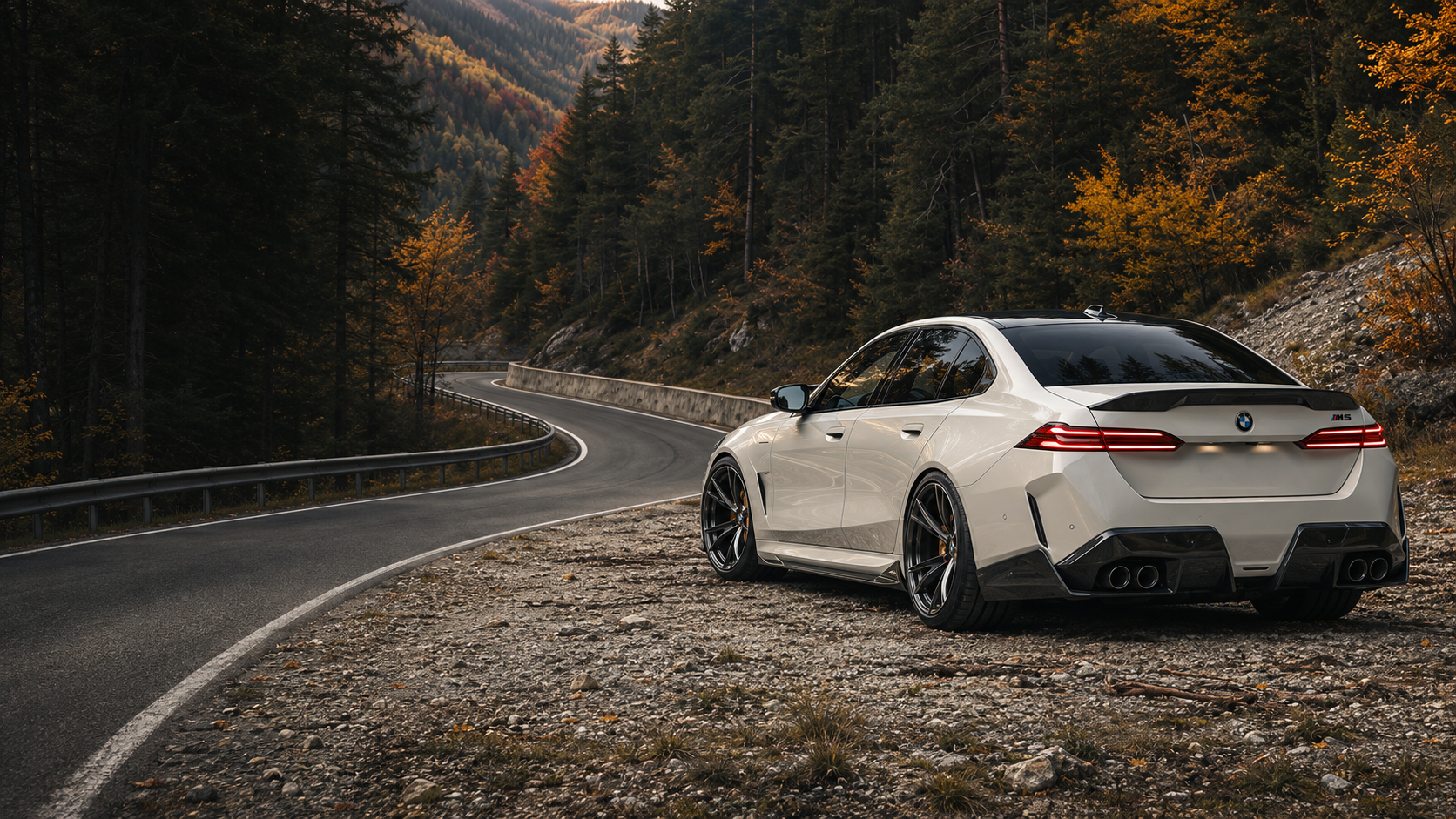
Connect Higgsfield in ChatGPT, attach a photo and describe one camera move. Ask for a credit quote before you approve the run. Then open the finished MP4 and check its framing.
On this page
Watch the output
A five-second orbit around a parked car. Use the links below to open the original vertical clip.
Before you start
- Photo. Choose one you have permission to use.
- Higgsfield account. Higgsfield lists an active paid subscription as a requirement for connecting to an AI agent.
- ChatGPT plugin. Find Higgsfield in the Plugins Directory.
How to animate a photo with Higgsfield in ChatGPT
These screenshots show the workflow from our car test. Use the highlighted controls to follow along.
Connect Higgsfield
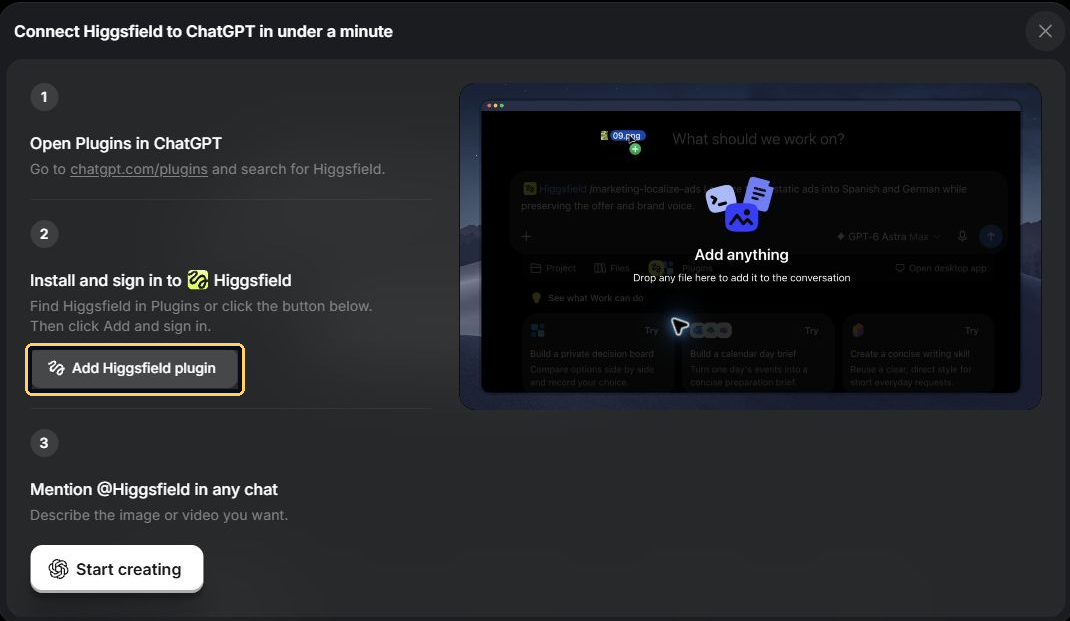
01 Add the Higgsfield plugin
Open the official Higgsfield listing in ChatGPT’s Plugins Directory and add it. The Higgsfield setup page also has an Add Higgsfield plugin button.
02 Connect your account
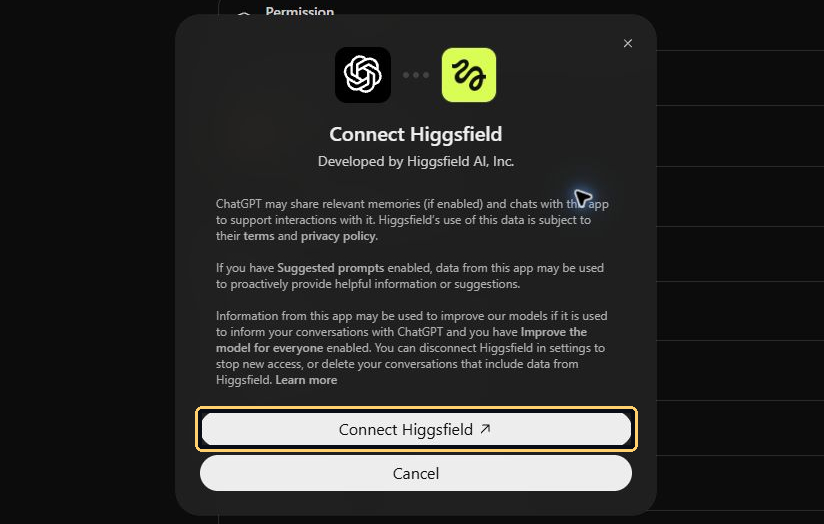
Select Connect Higgsfield, sign in, and check the account and permissions shown in the connection prompt.
Prepare the shot
03 Select Higgsfield in the chat
Start a chat, type @Higgsfield, and pick the plugin. Look for the Higgsfield chip in the message box before you send your request.

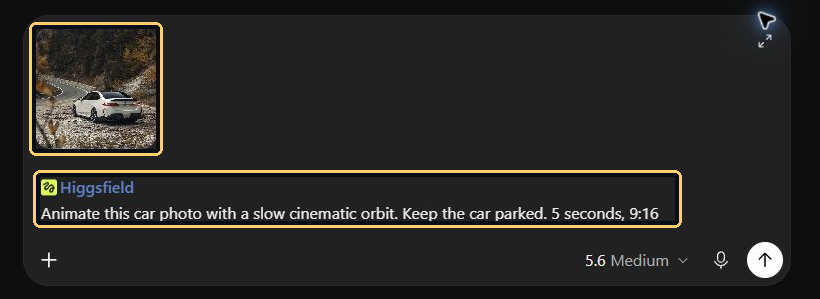
04 Attach the photo and describe the shot
Attach your photo. In the prompt, name one camera move, what should stay still, and the clip’s length and aspect ratio.
Prompt from our test
Animate this car photo with a slow cinematic orbit. Keep the car parked. 5 seconds, 9:16
Generate and review
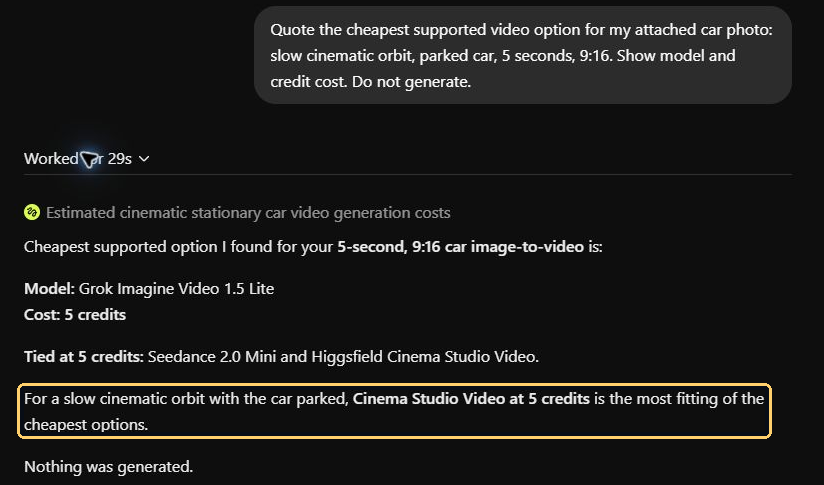
05 Ask for a quote and approve one run
- Before you approve. Ask for the model and credit cost. Add “Do not generate yet.”
- When you’re ready. Confirm the model, number of clips, and your credit limit.
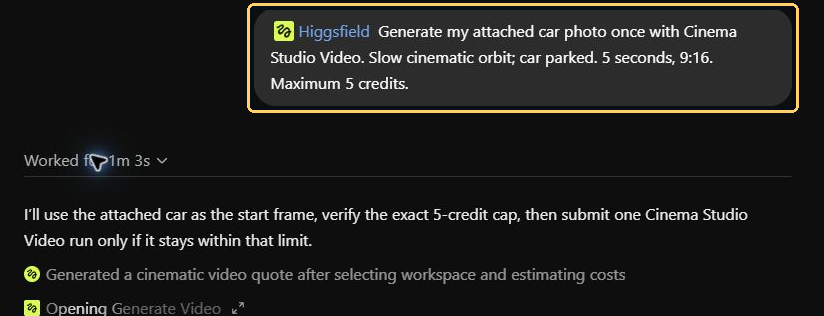
06 Open the result and check its shape
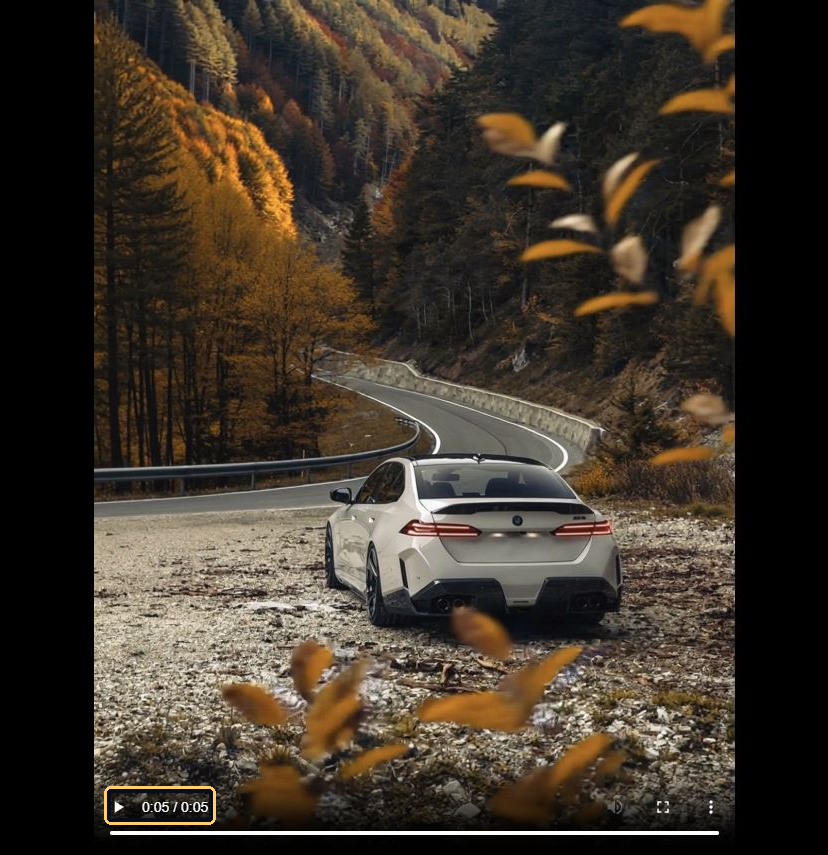
Play the whole clip and check the camera move, subject, and framing. If the preview stalls, ask for the existing job’s status and output link before generating again.
What our test produced
We ran the sample on . Use the quote for your own job to check the cost. Use the downloaded file to confirm the actual dimensions.
| Check | What we saw |
|---|---|
| Shot | A slow orbit around a parked car |
| Model | Higgsfield Cinema Studio Video |
| Duration | 5.04 seconds |
| Frame size | 1244 × 1660 pixels, about 3:4. We requested 9:16. |
| Charge | Five credits, as reported in the job audit |
If you need an exact 9:16 export, check the file before you edit or post. If needed, reframe it on a 9:16 canvas and check that the car stays in view throughout the orbit.
100 copy-and-paste Higgsfield prompts
Pick a category below. The full library is here in the article, with 10 prompts in each of 10 categories.
- Replace bracketed words such as [SUBJECT] with your own details.
- Attach your reference if the prompt calls for a photo.
- Ask for a credit quote before you approve a generation.
Download the 100-prompt guide (PDF)
Camera moves 1–10
- Slow push-in
@Higgsfield Create a 5-second shot that slowly pushes toward [SUBJECT]. Keep the subject centred, the background stable and the lighting soft. 9:16.
- Slow pull-back
@Higgsfield Create a 5-second shot that starts close to [SUBJECT] and pulls back to reveal [LOCATION]. Keep the movement smooth and continuous. 9:16.
- Quarter orbit
@Higgsfield Make a 5-second clockwise 90-degree camera orbit around [SUBJECT]. Preserve its shape and surface details. 9:16.
- Left tracking shot
@Higgsfield Track left beside [SUBJECT] as it moves slowly through [LOCATION]. Keep a constant camera distance and natural background parallax. 5 seconds, 9:16.
- Right tracking shot
@Higgsfield Track right beside [SUBJECT] in [LOCATION]. Keep the subject sharp, with gentle background motion and no sudden zoom. 5 seconds, 9:16.
- Pedestal reveal
@Higgsfield Start near the base of [SUBJECT] and raise the camera vertically to reveal its full height. Keep the camera level. 5 seconds, 9:16.
- Crane reveal
@Higgsfield Begin close behind [FOREGROUND OBJECT], then lift the camera to reveal [LOCATION]. Use one smooth move with believable scale. 5 seconds, 16:9.
- Dolly-zoom tension
@Higgsfield Create a restrained dolly-zoom effect on [SUBJECT]. Keep its size nearly constant while the background perspective changes. 5 seconds, 16:9.
- Top-down reveal
@Higgsfield Begin directly above [SUBJECT] on [SURFACE], then slowly widen the view. Keep the composition clean and symmetrical. 5 seconds, 9:16.
- Focus pull
@Higgsfield Keep the camera still. Shift focus from [FOREGROUND OBJECT] to [SUBJECT] behind it. 5 seconds, 16:9.
FPV and drone shots 11–20
- Doorway fly-through
@Higgsfield Create an FPV-style move through an open doorway into [ROOM]. Follow a clear, unobstructed path and slow near [SUBJECT]. 5 seconds, 16:9.
- Forest path
@Higgsfield Fly an FPV-style camera along a wide forest path, passing between well-spaced trees. Use gentle banking, natural daylight and no collisions. 5 seconds, 16:9.
- Coastal glide
@Higgsfield Glide above a coastal cliff toward [LANDMARK]. Keep the horizon steady, water motion natural and the turn gentle. 5 seconds, 16:9.
- Warehouse reveal
@Higgsfield Fly through a spacious empty warehouse toward [PRODUCT] on a central platform. Slow down before the product fills the frame. 5 seconds, 16:9.
- Rooftop approach
@Higgsfield Approach [BUILDING] from above, then arc toward its rooftop. Preserve the architecture and use a smooth, believable drone path. 5 seconds, 16:9.
- Bridge pass
@Higgsfield Move an FPV-style camera beneath a large empty bridge, then reveal [LANDSCAPE] beyond. Keep clear of structures and avoid abrupt turns. 5 seconds, 16:9.
- Showroom fly-through
@Higgsfield Follow a wide aisle through [SHOWROOM], ending on [HERO PRODUCT]. Keep vertical lines stable and the route easy to follow. 5 seconds, 16:9.
- Desert sweep
@Higgsfield Sweep low above empty desert dunes toward [SUBJECT]. Add gentle banking and visible ground parallax, with no extreme acceleration. 5 seconds, 16:9.
- Stadium reveal
@Higgsfield Fly over an empty stadium entrance and reveal the field from above. Keep the geometry consistent and the camera move slow. 5 seconds, 16:9.
- Miniature desk flight
@Higgsfield Create an FPV-style camera move through my uploaded desk scene, treating objects as large landmarks. Follow a clear path and preserve their appearance. 5 seconds, 9:16.
Product and advertising shots 21–30
- Studio hero
@Higgsfield Animate my uploaded [PRODUCT] in a clean studio hero shot. Use a slow push-in, controlled reflections and a simple [COLOUR] background. 5 seconds, 9:16.
- Texture macro
@Higgsfield Show a macro detail of [PRODUCT MATERIAL], then gently reveal more of the product. Keep the texture realistic and branding unchanged. 5 seconds, 9:16.
- Bottle condensation
@Higgsfield Create a close product shot of my uploaded [BOTTLE] with subtle condensation and soft backlight. Keep the label stable and readable. 5 seconds, 9:16.
- Shoe turntable
@Higgsfield Show my uploaded [SHOE] rotating slowly on a studio turntable. Preserve its silhouette, stitching and sole design. 5 seconds, 9:16.
- Watch detail
@Higgsfield Create a luxury close-up of my uploaded [WATCH]. Move the camera gently across the dial and strap, with restrained reflections. 5 seconds, 9:16.
- Food hero
@Higgsfield Create a warm close-up of [FOOD] on [PLATE]. Add gentle steam only if appropriate, with a slow camera push and natural texture. 5 seconds, 9:16.
- Unboxing reveal
@Higgsfield Show hands lifting the lid from [PRODUCT BOX] to reveal [PRODUCT]. Keep packaging consistent, hand movement simple and text unchanged. 5 seconds, 9:16.
- Light sweep
@Higgsfield Keep my uploaded [PRODUCT] still while one soft light sweeps across it. Use a dark background and controlled highlights. 5 seconds, 9:16.
- Lifestyle placement
@Higgsfield Place my uploaded [PRODUCT] naturally in [LOCATION]. Create a slow camera move with matching light, contact shadows and believable scale. 5 seconds, 9:16.
- Two-beat product ad
@Higgsfield Create a short ad: first a clear close-up of [PRODUCT], then a wider hero view in [LOCATION]. Use one clean cut and no invented claims. 5 seconds, 9:16.
Floating and surreal shots 31–40
- Floating product
@Higgsfield Make my uploaded [PRODUCT] hover gently above [SURFACE]. Keep it rigid, with a believable shadow and a slow camera move. 5 seconds, 9:16.
- Levitation portrait
@Higgsfield Use my consenting subject photo for a surreal levitation shot. The person floats gently above the ground, with stable anatomy and soft shadows. 5 seconds, 9:16.
- Suspended ingredients
@Higgsfield Create a product shot with [INGREDIENTS] suspended around [PRODUCT]. Keep the product shape and label unchanged. 5 seconds, 9:16.
- Floating pages
@Higgsfield Show blank paper sheets floating slowly around [SUBJECT] in a studio. Use soft motion and clear separation, with no readable text. 5 seconds, 9:16.
- Zero-gravity desk
@Higgsfield Animate selected objects from my uploaded desk photo in gentle zero gravity. Keep each object intact and separate, with no collisions. 5 seconds, 16:9.
- Orbiting particles
@Higgsfield Surround [SUBJECT] with a sparse ring of softly glowing particles. Keep the subject clear and the effect restrained. 5 seconds, 9:16.
- Floating fabric
@Higgsfield Show a single flowing fabric ribbon suspended beside [PRODUCT]. Use gentle folds, soft light and no obstruction of the product label. 5 seconds, 9:16.
- Cloud platform
@Higgsfield Place [SUBJECT] on a stylised cloud platform above a calm sky. Move the camera slowly while preserving the subject design. 5 seconds, 9:16.
- Suspended water
@Higgsfield Create a stylised ring of suspended water around [PRODUCT]. Keep the label visible and the product rigid. 5 seconds, 9:16.
- Miniature giant
@Higgsfield Place a miniature [SUBJECT] in a large everyday [LOCATION]. Keep scale cues consistent, with matching shadows and a gentle push-in. 5 seconds, 16:9.
Car and vehicle shots 41–50
- Parked car orbit
@Higgsfield Animate this car photo with a slow cinematic orbit. Keep the car parked. 5 seconds, 9:16.
- Front-quarter reveal
@Higgsfield Reveal my uploaded [VEHICLE] from behind a foreground wall, ending on its front quarter. Keep the vehicle parked and the camera slow. 5 seconds, 16:9.
- Side-profile track
@Higgsfield Track parallel to [VEHICLE] moving slowly on a closed empty road. Preserve its wheel geometry and body proportions. 5 seconds, 16:9.
- Headlight close-up
@Higgsfield Create a close-up of my uploaded vehicle headlight, then pull back slightly. Use moody studio lighting and stable body details. 5 seconds, 9:16.
- Wheel macro
@Higgsfield Show a stationary wheel detail from my uploaded [VEHICLE]. Slide the camera gently across the rim and tyre texture. 5 seconds, 9:16.
- Overhead car shot
@Higgsfield Show my uploaded car from above on an empty [SURFACE]. Move slowly along its centre line, preserving its roof and proportions. 5 seconds, 16:9.
- Rainy showroom
@Higgsfield Place my uploaded [VEHICLE] in a covered showroom with rain outside. Keep the car dry, with realistic reflections and a slow orbit. 5 seconds, 16:9.
- Sunrise silhouette
@Higgsfield Show [VEHICLE] parked against a sunrise landscape. Move from a silhouette toward visible body detail without changing its design. 5 seconds, 16:9.
- Interior detail
@Higgsfield Use my uploaded interior reference to create a slow glide across the dashboard. Preserve buttons, materials and screen layout. 5 seconds, 16:9.
- Motorcycle hero
@Higgsfield Create a low-angle studio hero shot of my uploaded [MOTORCYCLE]. Keep it parked, with stable proportions and a restrained camera push. 5 seconds, 9:16.
People and fashion 51–60
- Portrait motion
@Higgsfield Animate my consenting subject portrait with a natural blink and slight head turn. Preserve identity, facial proportions and lighting. 5 seconds, 9:16.
- Outfit walk
@Higgsfield Use my uploaded subject and outfit references. Show a short, natural walk in [LOCATION], preserving clothing design and face. 5 seconds, 9:16.
- Fabric close-up
@Higgsfield Create a close fashion shot of [GARMENT], highlighting fabric texture as the subject turns slightly. Avoid changing patterns or adding accessories. 5 seconds, 9:16.
- Editorial turn
@Higgsfield Show my consenting subject making one gentle turn toward the camera. Use editorial studio lighting and preserve the outfit and identity. 5 seconds, 9:16.
- Window-light portrait
@Higgsfield Place my consenting subject near a window in [ROOM]. Add a slight smile and soft camera push, with natural skin texture. 5 seconds, 9:16.
- Silhouette entrance
@Higgsfield Show an original adult character entering a softly backlit doorway. Reveal only a simple outline, then a little face detail. 5 seconds, 16:9.
- Athlete preparation
@Higgsfield Show an original adult athlete tightening a shoelace before training. Keep the action simple, hands natural and branding absent. 5 seconds, 9:16.
- Creator product hold
@Higgsfield Use my uploaded consenting creator and product photos. Show the creator holding the product still beside their face, with natural blinking. 5 seconds, 9:16.
- Hair movement
@Higgsfield Animate my consenting subject photo with a gentle breeze moving the hair. Keep facial identity and outfit fixed, without dramatic head motion. 5 seconds, 9:16.
- Backstage documentary
@Higgsfield Show an original adult creator checking a camera on a studio set. Use subtle handheld movement, practical lighting and a natural performance. 5 seconds, 16:9.
Places and atmosphere 61–70
- Golden-hour street
@Higgsfield Create a calm golden-hour shot of [STREET]. Move the camera slowly forward, with consistent architecture and natural shadows. 5 seconds, 16:9.
- Rainy window
@Higgsfield Show rain moving down a window with [CITY] softly blurred behind it. Keep the camera still and the droplets believable. 5 seconds, 16:9.
- Cafe morning
@Higgsfield Create a quiet morning view inside [CAFE]. Use a slow push-in, warm window light and gentle background activity. 5 seconds, 16:9.
- Mountain reveal
@Higgsfield Move slowly past a foreground rock to reveal [MOUNTAIN LANDSCAPE]. Keep cloud motion subtle and the horizon steady. 5 seconds, 16:9.
- Ocean horizon
@Higgsfield Create a fixed shot of calm ocean waves at [TIME OF DAY]. Keep the horizon level and the water motion natural. 5 seconds, 16:9.
- Neon alley
@Higgsfield Create an original neon-lit alley at night with wet pavement reflections. Use a slow forward move and no readable brand signs. 5 seconds, 9:16.
- Interior architecture
@Higgsfield Use my uploaded [ROOM] photo for a slow architectural camera glide. Preserve straight walls, furniture layout and material textures. 5 seconds, 16:9.
- Museum detail
@Higgsfield Create a slow reveal of an original sculpture in a quiet gallery. Use soft spotlights, stable geometry and restrained shadows. 5 seconds, 16:9.
- Garden path
@Higgsfield Move gently along a garden path toward [FOCAL POINT]. Add subtle leaf movement and natural sunlight without rapid camera turns. 5 seconds, 16:9.
- Night skyline
@Higgsfield Create a slow lateral shot of an original city skyline at night. Keep buildings rigid, lights stable and the camera level. 5 seconds, 16:9.
Transitions and visual effects 71–80
- Foreground wipe
@Higgsfield Create a transition from [SCENE A] to [SCENE B] as a foreground object fully covers the lens. Match the camera direction across both scenes. 5 seconds, 9:16.
- Match cut
@Higgsfield Create a match cut between [OBJECT A] and [OBJECT B] with similar shapes and framing. Use one clear cut, with no morphing. 5 seconds, 9:16.
- Whip-pan transition
@Higgsfield Connect [SCENE A] to [SCENE B] using one controlled horizontal whip pan. Match the movement direction and end on a stable composition. 5 seconds, 9:16.
- Light-flash transition
@Higgsfield Move from [SCENE A] to [SCENE B] through one brief soft light flare. Avoid repeated flashing and keep the final subject readable. 5 seconds, 9:16.
- Dust reveal
@Higgsfield Reveal [PRODUCT] from behind a small, stylised dust cloud. Keep the product stable and the dust from hiding the label at the end. 5 seconds, 9:16.
- Glass reflection
@Higgsfield Show [SUBJECT] through a foreground glass reflection, then move to a clear view. Keep the subject shape stable and reflections plausible. 5 seconds, 16:9.
- Shadow reveal
@Higgsfield Start with the shadow of [SUBJECT], then tilt up to reveal the subject itself. Keep the shadow direction consistent with the light. 5 seconds, 9:16.
- Time-freeze look
@Higgsfield Create a stylised scene where [BACKGROUND ACTION] appears frozen while the camera slowly orbits [SUBJECT]. Keep all objects separate and intact. 5 seconds, 16:9.
- Weather change
@Higgsfield Create a gentle transition from cloudy to sunny light over [LOCATION]. Preserve the architecture and avoid sudden object changes. 5 seconds, 16:9.
- Paper-layer reveal
@Higgsfield Reveal [TOPIC] using separate textured paper cutouts with soft shadows. Move each layer independently with a gentle camera push. 5 seconds, 9:16.
Short stories and social clips 81–90
- Problem and solution
@Higgsfield Create a two-shot ad: show [SIMPLE PROBLEM], then [PRODUCT] being used for [SUPPORTED PURPOSE]. Use only supplied facts and no invented results. 5 seconds, 9:16.
- Before and after
@Higgsfield Use my approved before-and-after references for a two-shot reveal. Keep framing consistent and show only the supplied change. 5 seconds, 9:16.
- Hands-on demo
@Higgsfield Show one simple step in using [PRODUCT], based on my supplied instructions. Keep hands clear and the product appearance consistent. 5 seconds, 9:16.
- Recipe moment
@Higgsfield Show [INGREDIENT] being added to [DISH] in a close cooking shot. Keep the action simple, proportions believable and surfaces consistent. 5 seconds, 9:16.
- Travel opening
@Higgsfield Create a travel opening shot for [DESTINATION]: a calm approach to [LANDMARK] with natural light and clear geography. Make 5 seconds, 16:9.
- Event teaser
@Higgsfield Create a short event teaser showing [VENUE] as lights come on. Use a slow reveal, no crowds and no invented event details. 5 seconds, 9:16.
- Workspace story
@Higgsfield Use my uploaded desk photo. Show a simple camera move from [TOOL] toward [FINISHED OBJECT], suggesting a creative workflow. 5 seconds, 16:9.
- Object mini-story
@Higgsfield Show [OBJECT] gently rolling into frame and stopping beside [SECOND OBJECT]. Use a fixed camera and believable contact shadows. 5 seconds, 9:16.
- Looping background
@Higgsfield Create a seamless-looking background loop of [SUBTLE MOTION] in [LOCATION]. Keep the camera fixed and the opening and ending compositions similar. 5 seconds, 16:9.
- End-card background
@Higgsfield Create a clean moving background for a product end card. Keep [PRODUCT] to one side and leave clear empty space for text added later. 5 seconds, 9:16.
Image and reference tasks 91–100
- Product reference image
@Higgsfield Create a clean reference image of [PRODUCT] on a neutral background. Keep its full outline visible, with soft even lighting and no added text.
- Character sheet
@Higgsfield Create an original adult character sheet with a front portrait and full-body view of the same person. Keep face, clothing and colours consistent across both views.
- Location reference
@Higgsfield Create an empty reference image of [LOCATION] with clear layout, realistic materials and simple lighting. Leave an unobstructed path for a later camera move.
- Change background
@Higgsfield Edit my uploaded [SUBJECT] photo by replacing only the background with [LOCATION]. Match lighting and contact shadows while preserving the subject.
- Change product colour
@Higgsfield Edit my uploaded [PRODUCT] photo by changing only [PART] to [COLOUR]. Preserve geometry, materials, label text and all other details.
- Remove a distraction
@Higgsfield Remove [UNWANTED OBJECT] from my uploaded photo. Rebuild the background naturally, preserving the main subject, framing and lighting.
- Relight the reference
@Higgsfield Relight my uploaded photo with soft [DIRECTION] light. Preserve the subject, face, product design and composition.
- Prepare a vertical frame
@Higgsfield Extend my uploaded photo into 9:16. Preserve the original subject and fill only the new space with a consistent background.
- Alternate camera reference
@Higgsfield Create an alternate [CAMERA ANGLE] view of my uploaded [PRODUCT]. Preserve its dimensions, materials and identifying details.
- Storyboard contact sheet
@Higgsfield Create a four-panel storyboard for [SHORT IDEA]. Use one consistent original subject and location.
For a guide to assembling separate elements into an animation, see paper-cut animation with Claude and invideo. If you plan to add narration later, see the VoiceStudio and ElevenLabs guide.
Common questions
Check these details before approving another clip.
Can I ask for a quote without starting a job?
Yes. Ask for a credit quote and tell Higgsfield to wait for your approval. Our quote returned the model and cost before we submitted the clip.
Does every clip cost five credits?
The five credits in this guide were for our one Cinema Studio Video job. Ask for a quote for your chosen model and settings.
Why does my clip look wider than I asked for?
Check the file dimensions first. We requested 9:16 and received roughly 3:4. If your target needs 9:16, reframe the downloaded clip and check the crop before posting.
What if the player in ChatGPT does not load?
Ask for the status and output link for the existing job. When our inline player stalled, the MP4 opened directly in the browser.
Published