Official process guide
Bahrain Visa Extension: Online Steps, Fees and Documents
By Gaurav Agarwal
For a Bahrain visa extension, open the official Visa Extension Request on bahrain.bh, confirm “Extend Visa”, and choose whether the applicant is an Authorized Person, Guarantor, or Visa Holder without a guarantor. The fee depends on the visa category. Current official extension fees range from BHD 20 to BHD 50, and the National Portal lists one working day for the categories in this guide.
You will usually need the visitor's passport, the application form and a copy of the applicant's Bahrain ID card; sponsored visas also need the sponsor's CR or ID.
Jump to a step

01Check whether your visa category is listed
Bahrain does not publish one universal extension fee or one document list for every visitor. Match the name of the visa you already hold to the official category before you submit or pay.
| Official extension category | Fee | Official processing time |
|---|---|---|
| Three-month Visit eVisa for British and Irish citizens | BHD 20 | 1 working day |
| Three-month multiple-entry Visit eVisa | BHD 25 | 1 working day |
| GCC Visitor eVisa for visitors from GCC countries | BHD 25 | 1 working day |
| Family Visit eVisa | BHD 30 | 1 working day |
| Five-year multiple-entry Visit eVisa | BHD 25 | 1 working day |
| Three-month multiple-entry Visit eVisa for GCC residents | BHD 25 | 1 working day |
| Two-week single-entry Visit eVisa | BHD 25 | 1 working day |
| Business visa | BHD 40 | 1 working day |
| Return visa for one or several trips | BHD 50 | 1 working day |
| Events visa for the Formula 1 Grand Prix | BHD 25 | 1 working day |
These are the amounts and times currently shown on the official National Portal service pages. One working day is the usual time, not a promise of approval. If the name on your visa does not match a listed category, ask NPRA before paying. On NPRA's eVisa pages, one extension adds 14 days. If the portal quotes a different fee or period, the portal's figure applies.
02Bahrain visa extension: online steps
- Open the official Visa Extension Request. The public screen identifies the request type as Extend Visa.
- Open View Conditions. Compare your existing visa with the official extension categories and requirements.
- Choose the applicant type. Select Authorized Person, Guarantor, or Visa Holder (Without Guarantor), according to who is submitting the request.
- Follow the remaining screens to identify the visa. Enter the identifiers requested by the portal and confirm that the displayed visa is the one you intend to extend.
- Upload the documents requested for that category. Upload a clear passport scan valid for more than six months, and bring the original if NPRA asks for it.
- Review the category and fee before payment. Stop if the amount or service name does not match the official category.
- Submit and keep the request reference. Use the official Requests and Visa Management service to follow the request.
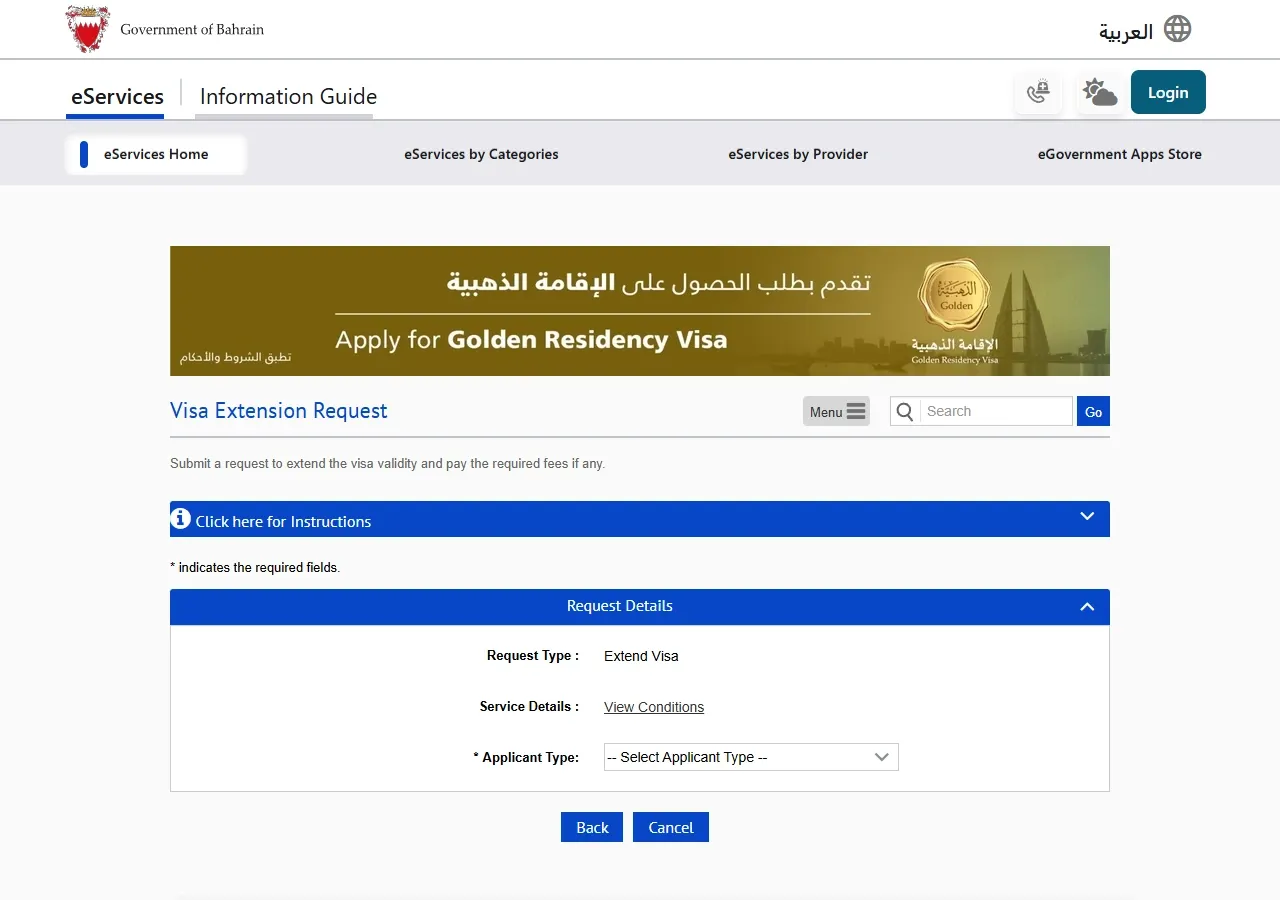
Keep passport numbers, personal numbers, payment details, and request references private.
03Which applicant type should you choose?
The first screen asks who is submitting the request. Choose the role that matches the current visa and the person completing the form.
- Authorized Person: use this when an authorized representative is completing the request.
- Guarantor: use this when the person or organization sponsoring the visa is submitting it.
- Visa Holder (Without Guarantor): use this for a visa route that does not have a guarantor and when the visa holder is submitting the request.
If you are unsure, do not guess. Call NPRA on 17077077 and confirm the correct applicant type for the visa before you submit.
04Documents commonly required
The official lists vary by category. Most extension categories in the National Portal ask for these core items:
- The visitor's original passport
- The service application form
- A copy of the applicant's or authorized person's Identity Card
Additional documents apply to some sponsored categories:
- Family visit: a copy of the sponsor company's valid Commercial Registration, or the sponsor's Identity Card for personal sponsorship
- Business visa: the sponsoring company or institution's valid Commercial Registration
- Return visa: an official guarantor letter, the guarantor's Commercial Registration, and the applicant or representative's Identity Card copy
- Formula 1 event visa: the sponsor company's valid Commercial Registration, or the sponsor's Identity Card for personal sponsorship
The administration may request additional information or documents. Use the exact checklist displayed for your category rather than uploading unrelated files.
05When should you apply?
Check the visa's current validity. Apply a few working days before expiry. Processing takes one working day, but a missing document can add delay.
If the visa has already expired, the visitor is outside Bahrain, or the portal does not display the expected visa, contact NPRA before making another request. Do not assume that a new application or a different category will correct an expired record.
06If the visa or request does not appear
- Confirm that the passport number and other identifiers match the existing visa record.
- Check whether the request belongs under a guarantor or authorized person rather than the visa holder route.
- Use Requests and Visa Management to check an existing request instead of submitting a duplicate.
- Keep the payment receipt and request reference if money was deducted.
- Call NPRA on 17077077 when the visa category, status, or payment outcome is unclear.
07Official links and help
- Visa Extension Request: official public extension form
- Requests and Visa Management: official extension categories, documents, fees, and times
- Visa Issuance Request without Guarantor: additional extension categories, documents, fees, and times
- NPRA contact information: call 17077077 for an unclear or exceptional case