Bahrain Residence Permit
Certificate Download and Print
Step-by-Step Guide with Screenshots
To download or print a Bahrain residence permit certificate, open the official Residency Services portal, choose Manage Requests and Residencies, sign in, open the correct record, then use the available download or print action. NPRA manages residence records; LMRA manages employer sponsored work permits.
Choose the residence permit task you need
RP means residence permit in this guide. Use the row that matches your task.
If the document you need is an ID certificate instead, download an electronic CPR certificate through the CPR service.
| Task | Official route and access |
|---|---|
| View, download or print an existing RP record | Choose Manage Requests and Residencies on the NPRA Residency Services portal. The public menu does not display a Standard eKey label for this option. |
| Check an LMRA work permit | Use the LMRA visa check guide. A work permit and a residence-permit copy are different tasks. |
| Issue, renew, cancel or renew a grace period | Choose the matching NPRA service. The current public menu labels these transaction routes Standard eKey. |
| Manage a self-sponsor residence permit | Use the separate Self-Sponsor Residency Services route. |
- Official Residency Details record
- Residency Certificate (PDF format)
- Official portal record with recipient requirements checked separately
Open Bahrain Residency Services
Go to the official Residency Services page on the Bahrain eServices portal. This is the central hub for all residency-related services provided by the Ministry of Interior – Nationality, Passports and Residence Affairs (NPRA).
Open Residency Services PortalFrom the homepage, you will see multiple residency-related services including Residency Issuance Request, Residency Renewal Request, Residency Cancellation Request, Grace Period Renewal Request, and Manage Requests and Residencies.
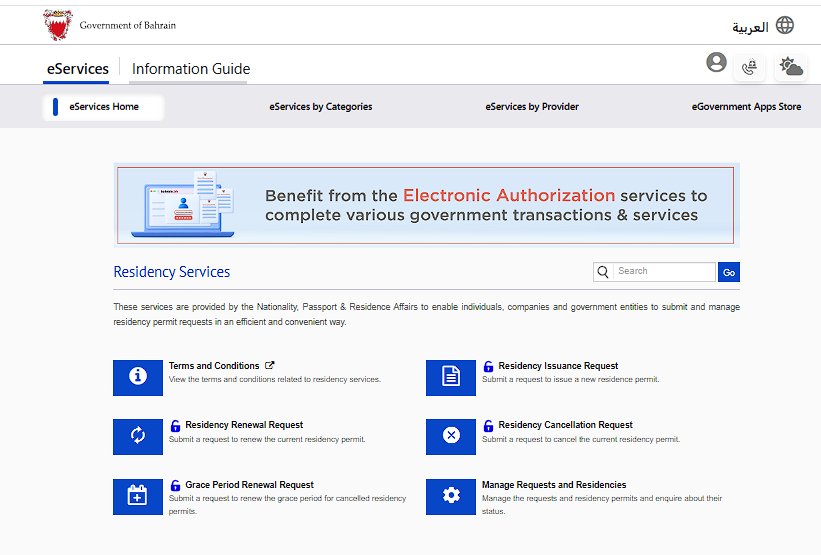
Select "Manage Requests and Residencies"
On the Residency Services page, locate and click Manage Requests and Residencies. This is the only option that allows you to view and download existing residency records.
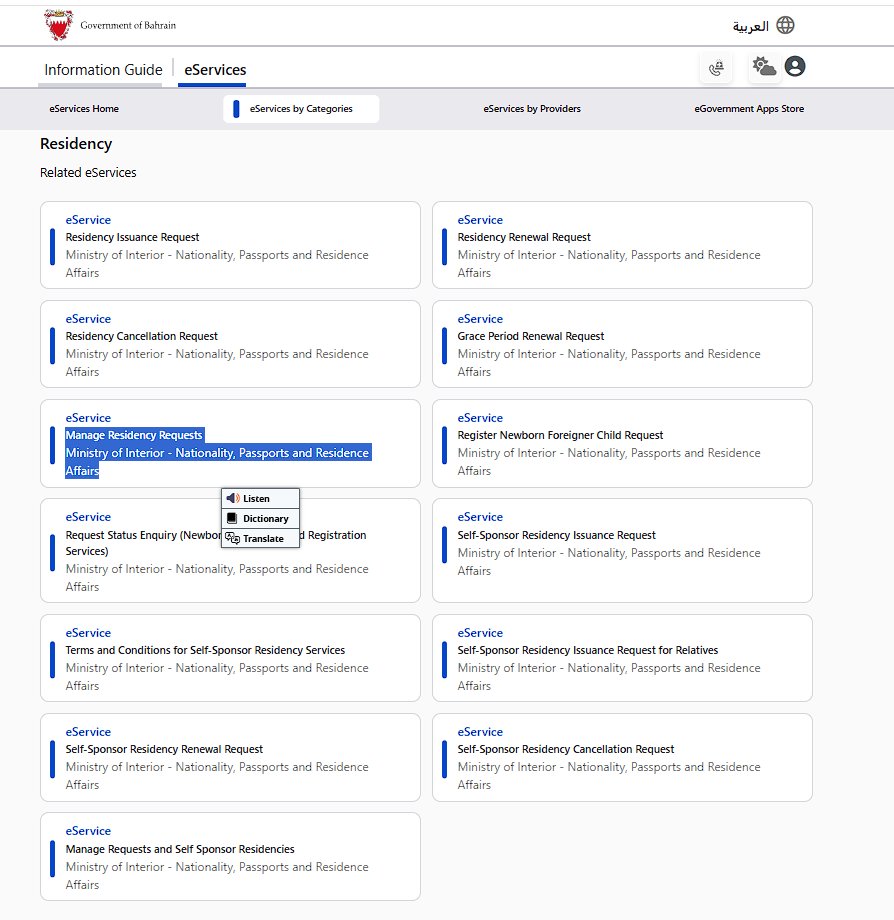
Access the eService
After selecting Manage Requests and Residencies, you will see the service description page. Click the blue "Use eService" button to proceed to the search form.
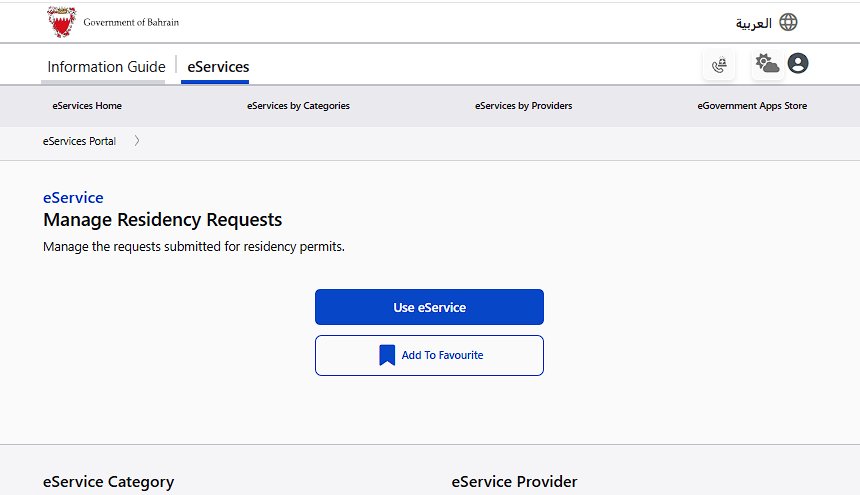
This will take you to the "Manage Requests and Residencies" form where you can search for specific residency records.
Enter Details and Download
Inside the service page, complete the following steps:
- Under Request Details, select "Specific Residency"
- In Residency Owner Details, choose your enquiry method: "Passport Details" or "Bahraini Personal Number" (CPR)
- If using passport details, enter your Passport Number, Date of Birth, and Nationality
- Click Search
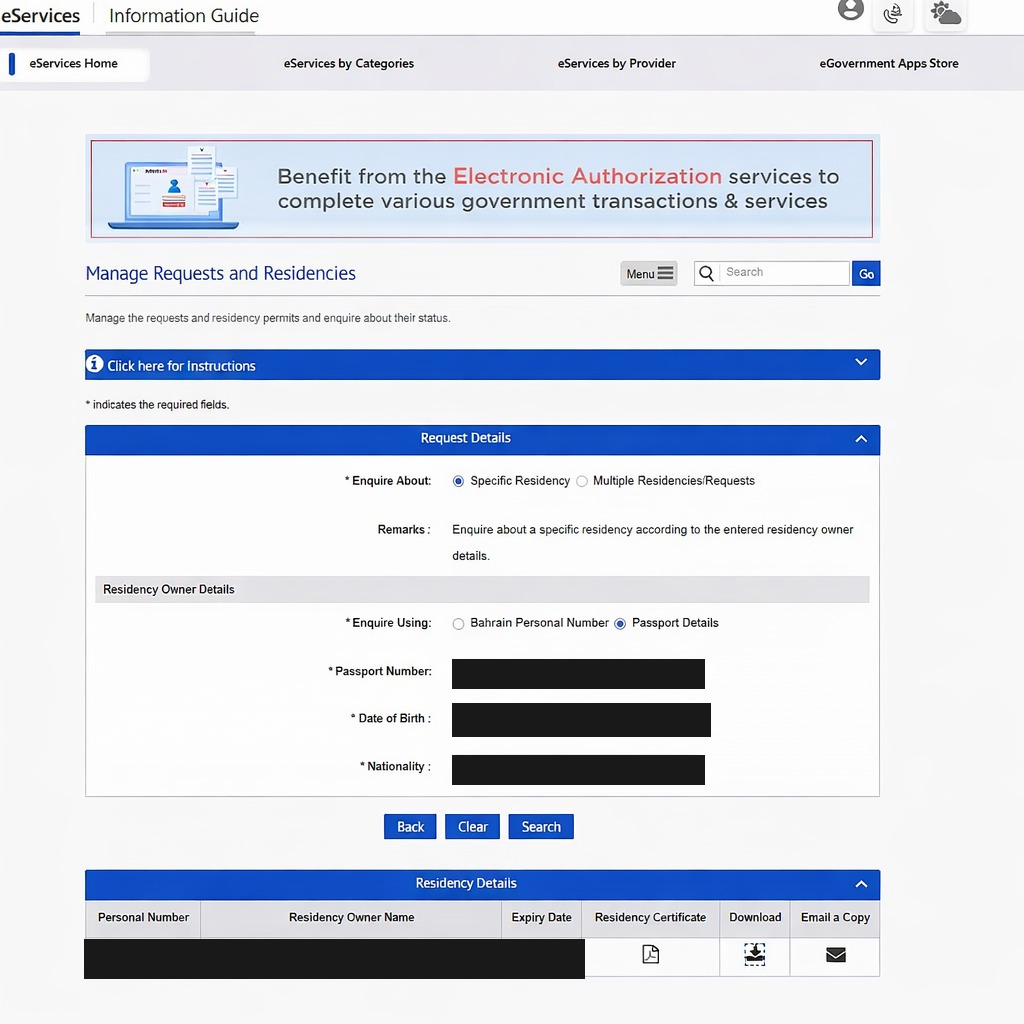
After searching, a Residency Details table will appear showing your Personal Number (CPR), Residency Owner Name, Expiry Date, and action icons.
To save your residency details:
- Click the Download icon to save the file directly, or
- Click the Residency Certificate icon to view it, then use Print → Save as PDF
- Use the Email a Copy option to receive it via email
Troubleshooting
If you do not see any results after searching, check the following:
If an Indian passport was renewed or needs renewal, consult Indian passport renewal in Bahrain and check which passport details the residence record currently uses.
Residency expired or under renewal – If your permit is currently being processed, it may not appear in the system.
Browser issue or session timeout – Try refreshing the page or using a different browser (Chrome or Edge recommended).
Pop-up blockers – If the download does not open, disable pop-up blockers for services.bahrain.bh
For persistent issues, you can contact the Ministry of Interior – NPRA directly through the official bahrain.bh portal.
Which residence document do you need?
Choose the route that matches your record. Use NPRA's National Portal for ordinary residence requests, the Golden Residency enquiry for Golden Residency, iGA's eKey service for an ID-card details certificate, and LMRA for work-permit validity. These are separate records, so one download does not replace every certificate.
Start with the document the receiving organisation named. A residence record, an ID-card details certificate, an LMRA work-permit result and an NPRA certificate answer different questions.
| Your situation | Official route | What you need | Published output or time |
|---|---|---|---|
| You need to manage or check an ordinary residence request | Manage Requests and Residencies | Follow the identity check shown by the live portal | Request or permit status |
| You hold Golden Residency | Golden Residency enquiry | Personal Number or Passport Number | View and print |
| You need identity details from the Population Registry | Print ID Card Details Certificate | eKey and a Bahrain ID card | 1 working day |
| You need employer-sponsored work-permit validity | View Expatriate Employee Data | Personal Number, Country and Passport Number | Status and validity |
| You need a separate formal NPRA certificate | NPRA Certifications | Application letter, valid passport and ID copies, a copy of the commercial, personal or agricultural register, and any other document the request needs | BHD 5 application plus BHD 10 certificate |
Print a Golden Residency permit
Golden Residency has a separate official path. The programme's own FAQ gives the full sequence and the search fields.
If the record does not appear, call the Golden Residency support number +973 17484000 for help.
- Open Bahrain.bh and choose Golden Residency eServices.
- Select Requests and Golden Residencies Visa Management.
- Under Request Details, choose Enquire About, then Specific Residency.
- Under Residency Owner Details, choose Enquire About, then Residency.
- Search with the Bahraini Personal Number or Passport Number.
- View and print the Golden Residency.
Use an ID certificate or MyGov when that is what you need
The Print ID Card Details Certificate service is the official Population Registry route for citizens and residents who hold a Bahrain ID card. It requires eKey and lists a process time of 1 working day. The page lists iGA number 17878000 and Contact Centre 80008001.
MyGov is the official mobile option. Its public page says the app uses eKey 2.0 and shows personal and family government documents, certificates and statements. It does not name the residence permit specifically, so check the document list after signing in rather than assuming it will appear.
Before you start, have the personal number or CPR, passport number and eKey access available. Use only a private device when saving identity records.
- For an identity-details certificate, open the official service and sign in with eKey.
- Confirm that the certificate is for the correct person and current ID record.
- Use the service's print option when the certificate is ready.
- For mobile access, open MyGov, sign in with eKey 2.0 and check Personal Documents or Certificates and Statements.
Print the residence record after an LMRA work-permit action
LMRA separates the work permit from the residence record. Use the employee-data lookup to check work-permit status and validity. It asks for Personal Number, Country and Passport Number.
For a dependant application, LMRA says an employer prints the residence permit through the National Portal after an employee who was outside Bahrain arrives. If the employee is already in Bahrain, LMRA says to print through the National Portal or contact 8000 8001.
After a work-permit renewal, LMRA again directs the user to print the resident permit through the National Portal or contact NPRA. Renewal is available 5 months before expiry for an existing 6-month permit and 6 months before expiry for an existing 1-year or 2-year permit. The passport must have at least two months of validity.
| Service | Fee | Published time |
|---|---|---|
| Dependant residence permit | BHD 90 service plus BHD 5 administration | LMRA 3 working days; cooperative entities 7 working days |
| Work-permit renewal | BHD 97.5 for 6 months; BHD 195 for 1 year; BHD 390 for 2 years; plus BHD 5 administration | 1 working day |
| Work permit for a resident whose residence was not issued through LMRA | BHD 195 for 1 year or BHD 390 for 2 years; plus BHD 5 administration | 2 working days |
Two common residence-proof situations
A bank asks for current residence proof. Ask whether it accepts a National Portal residence record, needs the Population Registry ID-card details certificate, or requires a separately issued NPRA certificate. Do not pay for a certificate until the bank names the document it needs.
An employer needs the permit after an employee arrives. Complete the LMRA work-permit process first. LMRA's dependant instructions say the employer then prints the residence permit through Bahrain's National Portal once the employee arrives.
The permit is expired or being renewed. Downloading a record does not renew it. Check the underlying LMRA or NPRA transaction first, then generate a fresh record after the status changes.
What the official pages don't say
The public Residency Services page does not state which identity fields appear after opening Manage Requests and Residencies. The MyGov page does not name the residence permit specifically. The pages also do not state that every case has stopped receiving a physical certificate. Follow the live service and confirm the required document with the receiving organisation.
Save the correct official contact
For LMRA work-permit and dependant questions, call +973 17506055. For the ID-card details certificate, the official page lists 17878000 and 80008001. Golden Residency lists +973 17484000.
NPRA's certifications page lists 17077077, Sunday to Thursday from 7:30 AM to 7:00 PM. That service is for separate certificates and lists its own documents and fees.
This is an independent guide, not a government service. Open the linked official page before entering personal details or paying a fee.
Official sources
Frequently Asked Questions
- Open Residency Services on services.bahrain.bh
- Click Manage Requests and Residencies
- Select Specific Residency
- Search using passport or CPR details
- Download or print the residency record
Choose the residence task before signing in
The National Portal groups several different NPRA actions under Residency Services. Downloading or printing an existing record is different from issuing, renewing or cancelling residence.
| What you need | Correct starting point |
|---|---|
| View an existing residence record or request | Manage Requests and Residencies |
| Follow an application submitted through the residency portal | Manage Residency Requests |
| Issue, renew, cancel or extend a grace period | Choose the named service from the Residency Services page |
| Check an employer-sponsored work permit | Use LMRA's employee-data lookup rather than the NPRA residence-request screen |
| Request a separate formal NPRA certificate | Check the NPRA certifications service, which has its own documents and fees |
This distinction prevents the most common wrong turn: starting a new residence application when the user only needs proof of an existing permit.
Save a clear residence record
- Open the official residency portal and sign in through the identity option displayed by the portal.
- Choose the management or enquiry route, then select the correct person or residence record.
- Review the name, passport details, permit type, validity and status before saving anything.
- Use the page's download or print control if it is shown.
- If only printing is available, choose Save as PDF in the trusted device's print dialog.
- Open the saved file once and confirm that the details and validity are readable.
A screenshot can help with a quick reference, but a downloaded or printed record is easier to read and share. Keep the file private. Residence records contain identity and immigration information.
The official NPRA eServices provider page lists the current residence issuance, renewal, cancellation, grace-period and management services in one place.
Common download and record problems
The residence does not appear
Confirm that you signed in with the identity connected to the record and that you opened residency management rather than a new request. Employer-sponsored workers should also check the LMRA permit record because the two systems answer different questions.
The status or passport details are old
Do not edit the downloaded file. Use the official service for the underlying update, then generate a fresh record after the system reflects the change.
The page opens but no download button appears
Look for a print action and use the browser's Save as PDF option. If neither appears, use the current portal help route. The guide does not promise a button label behind login because the authenticated interface can change.
The saved PDF is blank
Allow the record to finish loading, then print again from the same tab. Try a current browser and disable any extension that blocks the print window.
You need proof on a phone
The official MyGov app page says the app can show personal documents, certificates and statements through eKey 2.0. Check whether the required residence record is available in your account, then use the official sharing or viewing options offered there.
Residence permit download questions
Is a residence permit the same as a work permit?
No. NPRA manages residence services, while LMRA manages employer-sponsored work permits. A worker may need to check both records when an employer or government service asks for current status.
Can I download a Bahrain residence permit without eKey?
The residency management services use the sign-in options shown by the National Portal. Public information pages are visible without login, but personal records require identity verification.
Does downloading the record renew the residence?
No. Viewing, printing or saving proof does not extend validity. Renewal is a separate official service.
What if the employer or bank asks for a stamped certificate?
Ask what exact document they require. A portal residence record and a separately issued NPRA certificate are different products. The NPRA certifications service lists its own application documents and fees.
Where can I get official help?
Use the contact details on NPRA's service-centres page. It lists the call centre, service locations and current public hours.
Where can I see all identity and visa services?
The National Portal's identity, passports and visas directory groups the official services by task.
For every other Bahrain e-service, from CPR and LMRA to driving and Sijilat, use our Bahrain government services directory.