Bahrain motoring and travel guides
Bahrain parking payment: BenefitPay meters, airport and private car parks
By Gaurav Agarwal · Sources checked 6 October 2026
Read the sign at your exact space and use that operator’s payment route. BenefitPay supports participating parking meters, while airport and private facilities can use different systems. Confirm the plate, location, duration and active session before leaving the car.
Jump to a section
- Identify the parking system before opening an app
- BenefitPay meter parking: the published rules
- A practical payment check at the space
- Airport parking uses its own tariff and payment route
- Private facilities and operator apps
- When payment fails or a charge looks wrong
- Frequently asked questions
- Sources and checking date
Identify the parking system before opening an app
Bahrain does not have one verified payment rule covering every street, shopping centre, airport car park and private facility. Start with the sign at your actual space. Identify the operator, paid hours, permitted duration and payment method. A parking app that works in one area may not pay for the space across the road. Check the location and vehicle details before confirming a transaction.
This guide was checked on 6 October 2026. It uses BENEFIT’s official parking-service FAQ for BenefitPay meter rules, Bahrain Airport’s parking page for the airport’s separate system, and GDT’s contravention service to distinguish traffic notices from parking payments. It does not extend one operator’s tariff or free period to every parking space in Bahrain.
BenefitPay meter parking: the published rules
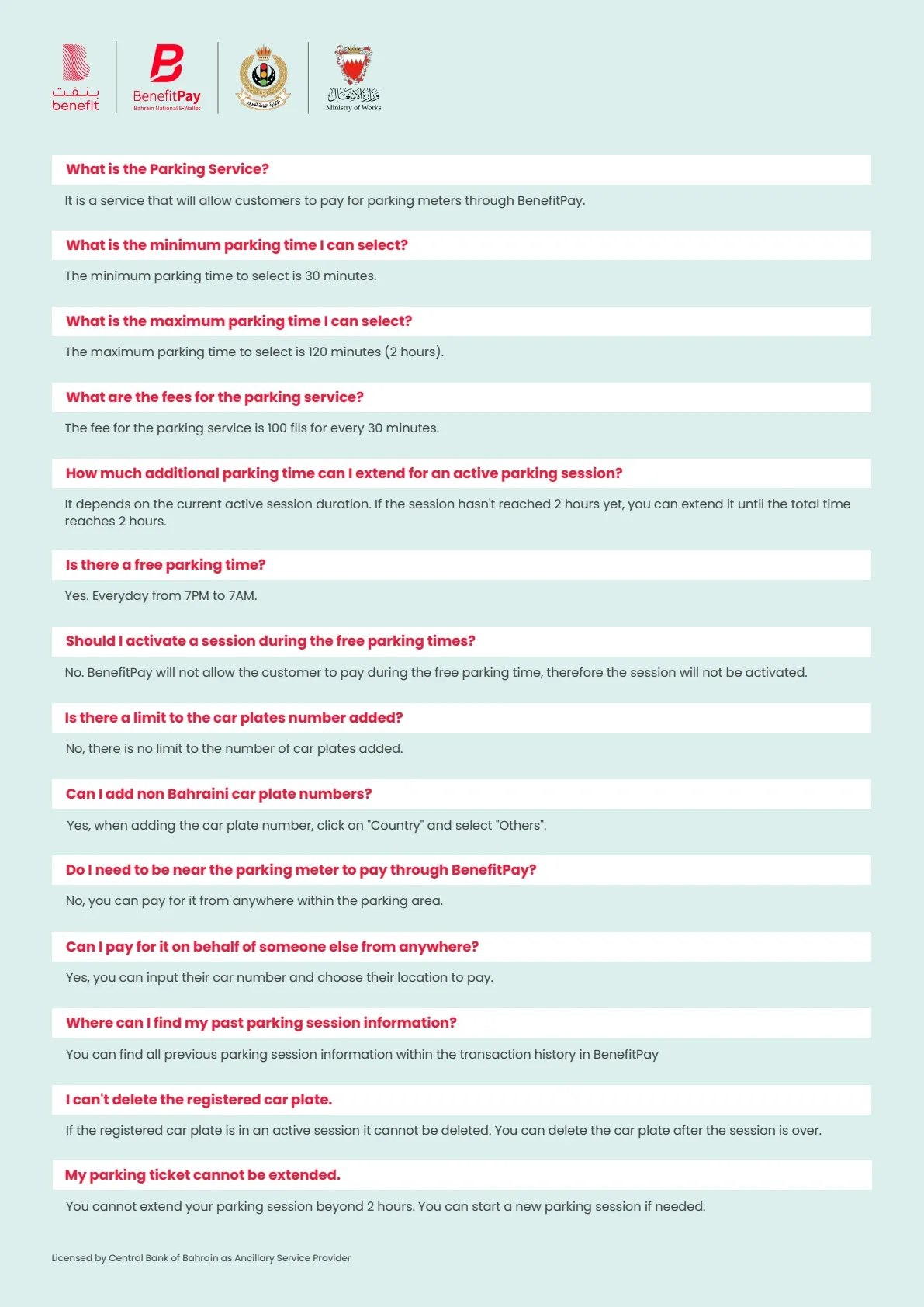
BENEFIT’s FAQ describes sessions from 30 to 120 minutes, charged at 100 fils per 30 minutes. It lists a free period from 7pm to 7am and says the app does not activate a paid session during that period. These are the rules in the provider’s document reviewed on 6 October 2026, not a claim that all Bahrain parking is free overnight.
The same FAQ allows an active session to be extended only until its total reaches two hours. It says a new session can be started afterwards if needed. Always also obey the signs governing the space; the ability to start an app session is not permission to ignore a restriction at the location. A payment method and the legal right to occupy a particular bay answer different questions.
For foreign plates, the FAQ says to choose “Others” under Country. It allows paying for another person’s car by entering the vehicle and location, and stores past sessions in transaction history. Check every character and the selected country before payment. If a plate is in an active session, the document says it cannot be deleted until that session ends.
A practical payment check at the space
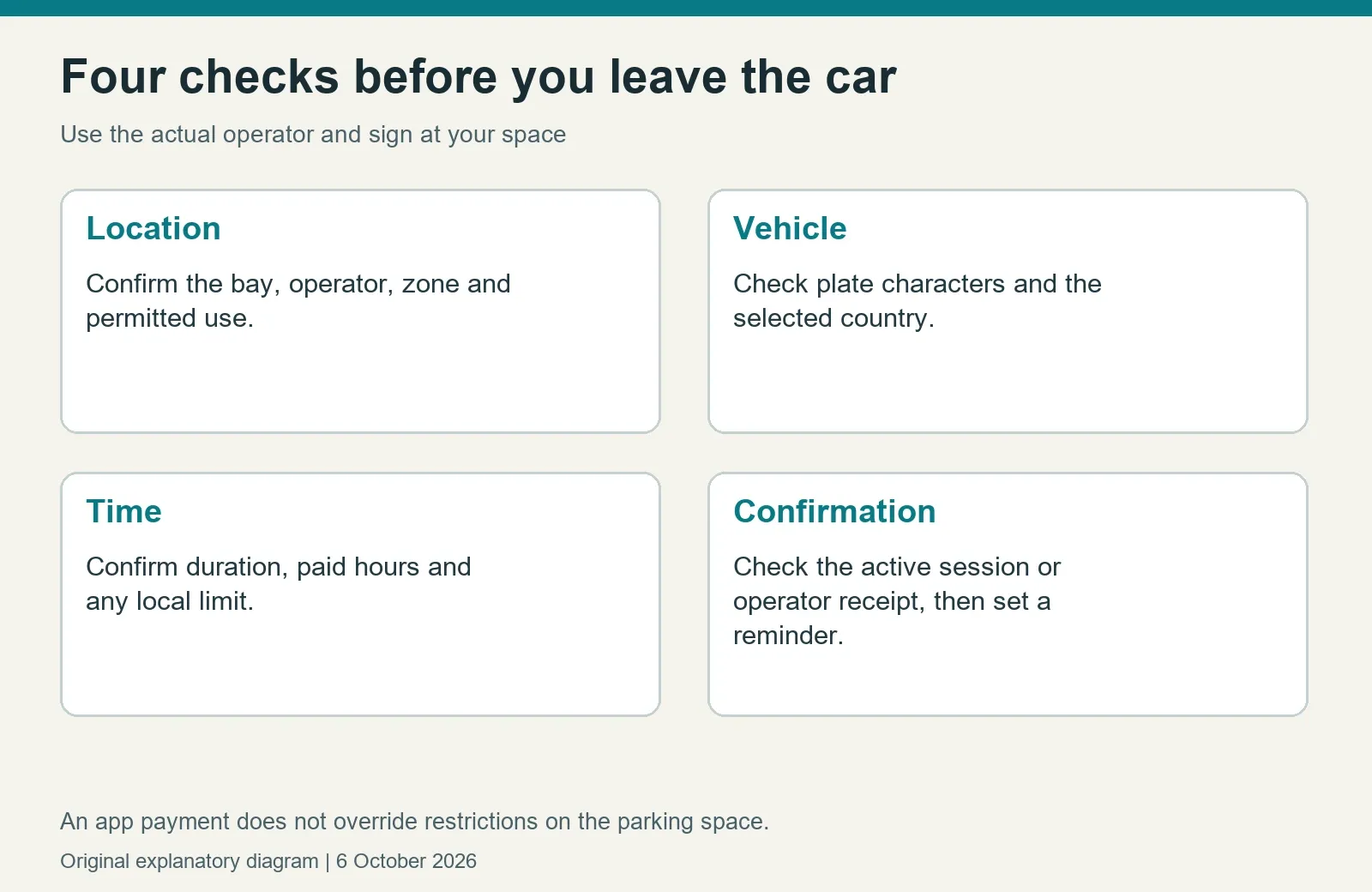
Read the nearest applicable sign before leaving the car. Confirm that the bay is available for your use and that you understand the duration and payment period. Look for the operator’s name and the location or zone information needed by its system. Do not assume a neighbouring car’s receipt or an old saved location applies to your space.
In the payment flow, check the country and plate, the selected parking location, start time, duration and amount. Complete the payment and look for an active session or confirmation, not just a bank notification. Set your own reminder comfortably before expiry. If the app can extend a session, check that the extension is actually confirmed and still permitted by the location’s rules.
For a rental or borrowed car, take particular care if the app remembers your usual vehicle. A perfectly successful payment against the wrong plate may not demonstrate payment for the car you parked. Save the confirmation until the visit and any rental reconciliation are complete. Avoid sharing screenshots containing account information or other people’s plate details publicly.
Airport parking uses its own tariff and payment route
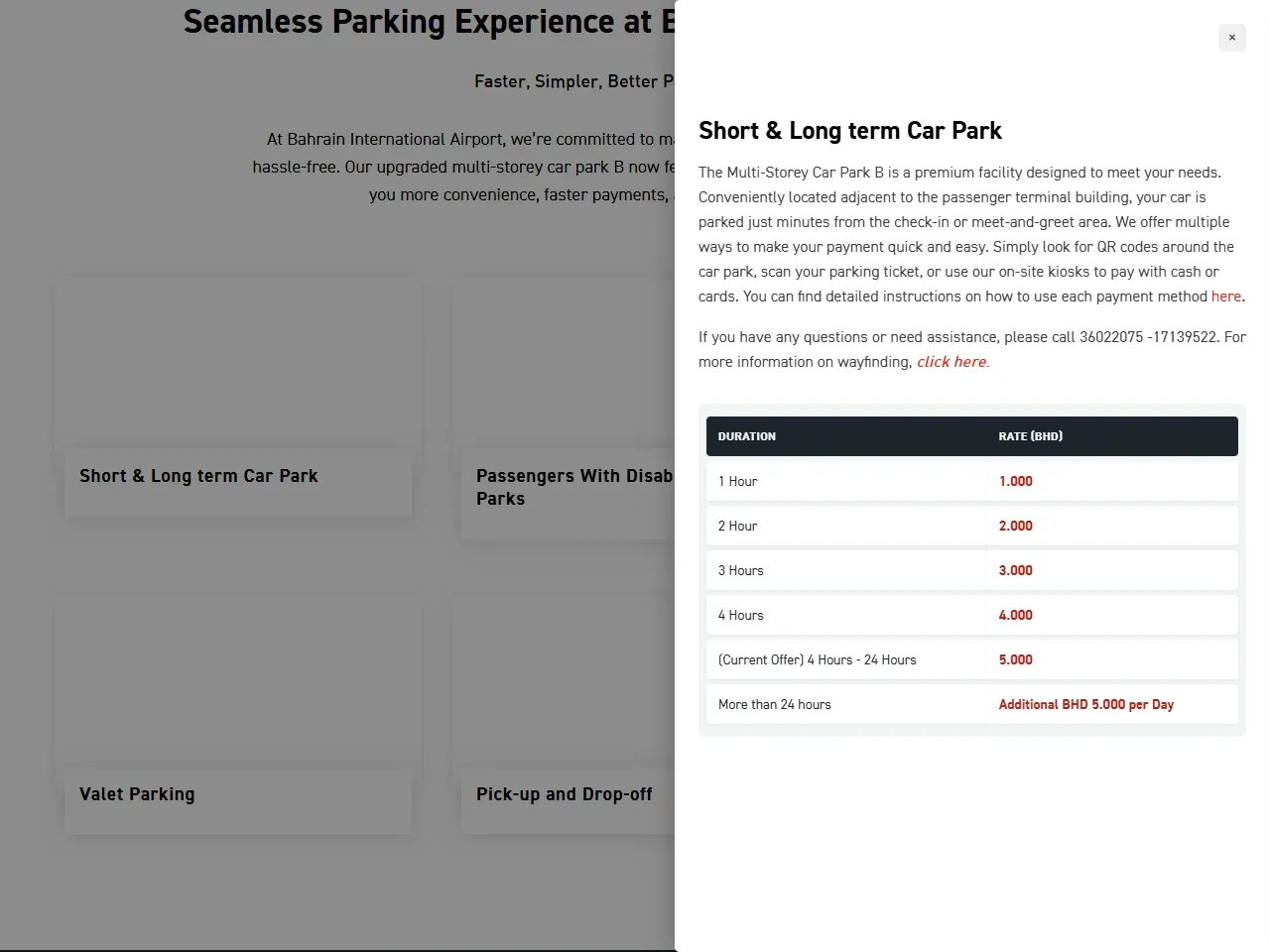
Bahrain Airport’s official parking page describes payment using QR routes, a scanned parking ticket or on-site kiosks accepting cash or cards. Its car parks, drop-off roads and valet service have separate descriptions. Choose the correct facility for the length of your stay, and check the current airport tariff before entering. A street-meter session in BenefitPay should not be assumed to pay an airport parking ticket.
Keep the entry ticket or reference secure and read the exit-payment instructions. For a longer trip, compare the facility’s daily charging basis and how you reach the terminal. For a passenger pickup, consider the time needed for immigration and baggage rather than waiting in a restricted drop-off area. The airport page is the appropriate checking route for current prices, accessibility provisions and any special offer.
A QR code should lead to the payment route identified by the operator at that facility. If the destination looks inconsistent with the official instructions, use the staffed or kiosk option and ask for help. Do not enter card details into a link sent by an unknown person merely because it claims to settle your parking.
Private facilities and operator apps
Check the facility’s own instructions for ticket validation, customer discounts and payment before exit. Some locations may use a ticket, a barrier or another access method. A company operating several facilities does not necessarily charge the same price at every site. Ask which location and tariff apply and retain any shop or venue validation until the parking transaction is complete.
If a venue advertises free parking, confirm the conditions rather than interpreting “free” as unlimited access. A validation may require a qualifying visit, a particular entrance or a time limit. These are questions to resolve with the venue; this guide does not invent conditions for a specific car park. For repeat visits, save the official facility information instead of relying on an old social-media answer.
When payment fails or a charge looks wrong
Check whether a session or transaction already exists before paying again. Note the time, location, plate entered and reference shown. If a meter, app or barrier does not work, use the operator’s displayed assistance route and ask what alternative payment method is accepted. A failed screen should not be treated as automatic permission to park without paying or to leave a restricted vehicle unattended.
For a disputed charge, gather the receipt, relevant sign details and any operator response. Send the information through the official support route, keeping personal information private. If a rental provider later charges an amount, ask for the underlying parking or contravention record and its contractual administration fee separately. A parking payment dispute is not necessarily the same process as contesting a traffic contravention. For the latter, see the Bahrain traffic cameras and fines guide.
Keep the evidence until the matter is resolved and avoid assuming an app uninstall cancels an obligation. If the issue concerns a bank transaction, also check the bank’s pending-versus-completed status. More local car and travel planning is available through the motoring and travel hub.
Frequently asked questions
Which app pays Bahrain parking meters?
BenefitPay offers a parking-meter payment service. Check the actual sign and supported location; it is not verified as a universal payment method for every private and public facility.
Can I pay for a non-Bahraini plate?
BENEFIT’s FAQ says to select “Others” under Country when adding it. Check the plate and location before confirming payment.
Is all parking free at night?
No universal rule is established here. The overnight free period described above belongs to the BenefitPay meter service’s published FAQ. Read the applicable signs and private-facility tariff.
Does a successful bank payment prove my session is active?
Check the parking service’s own confirmation and vehicle details as well. Keep the transaction reference and contact the operator if the payment and session records disagree.
Sources and checking date
Official authority and operator pages reviewed on 6 October 2026. A checking date records our review, not a promise that a tariff or eligibility rule will stay unchanged. Reopen the linked service before paying or travelling.